
In this story11 sections
- Why a password alone no longer guards a small business
- How to turn on two step verification on Gmail and your Google Account
- Google Authenticator app setup for Gmail, plus the backup codes
- Passkey vs 2-Step Verification on a Google account
- Two step verification for Google Workspace admin teams
- The WhatsApp six-digit PIN and the email that rescues it
- How to secure WhatsApp Business account from hacking
- Facebook, Instagram and the business portfolio switch
- Inside the OTP trick that hijacks Indian WhatsApp numbers
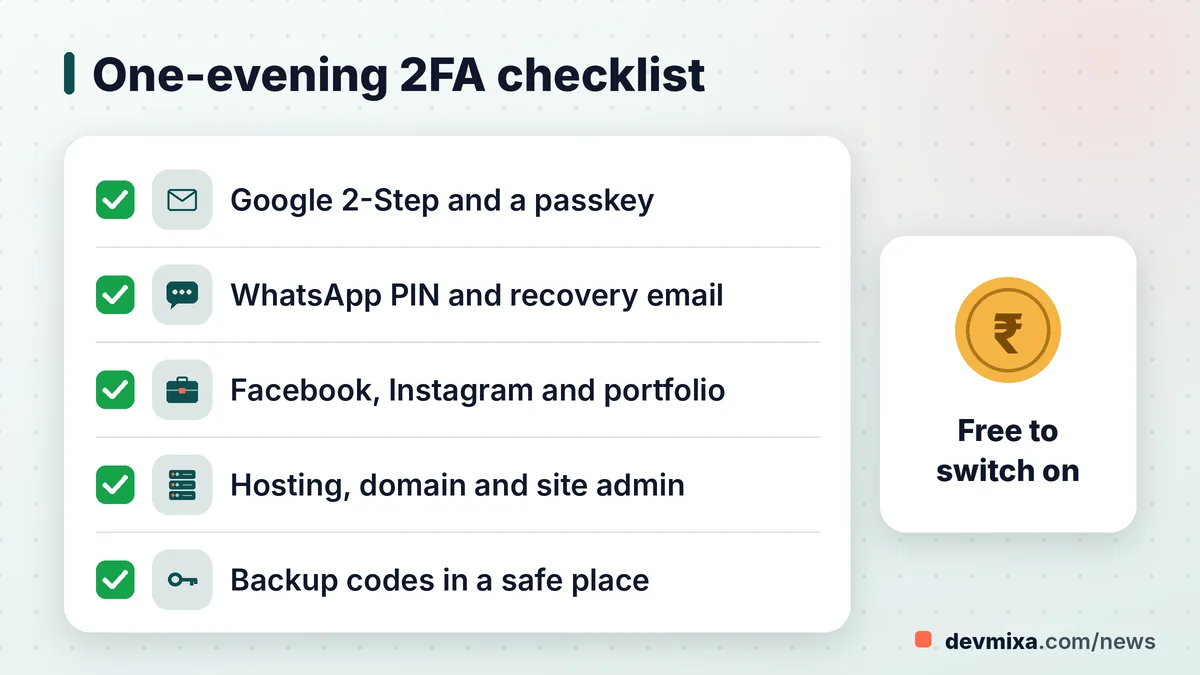
- A one-evening 2FA checklist for your shop or startup
- Frequently asked questions
A thief who learns your password today can read your Gmail, take over your shop's WhatsApp and spend your ad budget before lunch. A second step stops most of that cold. This guide shows how to turn on two step verification on Google, WhatsApp, Facebook, Instagram and Meta business tools, with menu paths checked in early November 2026 against official help pages wherever we could reach them.
| Item | Details |
|---|---|
| What | Adding a second check (app prompt, code, PIN, passkey or key) on top of your password |
| Who it affects | Anyone with Gmail, WhatsApp, Facebook, Instagram, Google Workspace or a Meta business portfolio |
| Cost | Free on every service in this guide; a hardware security key is the only optional purchase |
| Key waits | WhatsApp PIN reset without email: 7 days. New Google 2SV phone number: up to 7 days to be trusted |
| Official source | Google Account Help, WhatsApp Help Centre, Meta Business Help Centre |
| What to do | Switch on the second step, save backup codes, add a recovery email, enforce it for your team |
Why a password alone no longer guards a small business
Two-step verification means the service asks for something you have, such as your phone, after something you know, which is your password. A password can be copied from a leaked database, guessed or phished through a fake login page. The second step is a guard at the gate who also checks your ID card. Even if the password leaks, the thief still needs your phone, your passkey or your security key.
You will see the idea under several names. Google calls it 2-Step Verification. Meta calls it two-factor authentication, usually shortened to 2FA. WhatsApp calls its version two-step verification and uses a six-digit PIN. The labels differ; the principle is the same.
Why should a kirana store, a CA firm in Indore or a three-person design studio bother? Because their accounts are their storefront. The Gmail inbox holds GST letters, bank alerts and client files. The WhatsApp number is the order line. The Instagram handle carries years of reviews and followers. Lose one and you lose sales, reputation and sometimes money sent by customers to a scammer who now speaks in your name. CERT-In, India's national cyber security agency, has repeatedly urged organisations to use multi-factor authentication in its advisories, and it costs nothing to turn on.
How to turn on two step verification on Gmail and your Google Account
Open myaccount.google.com, choose Security & sign-in, and under "How you sign in to Google" select Turn on 2-Step Verification, then follow the screens. That is the full path on a computer, per Google's official 2-Step Verification help page. On an Android phone the same page sits under Settings, Google, Manage your Google Account, Security. One switch protects Gmail, Drive, YouTube, Google Business Profile access and every other service tied to that Google Account.
Google will ask you to confirm a phone number first and then add other methods. Work or school accounts may not let you change this yourself; Google tells those users to contact their administrator.
Picking the second step: prompts, app, SMS or passkey
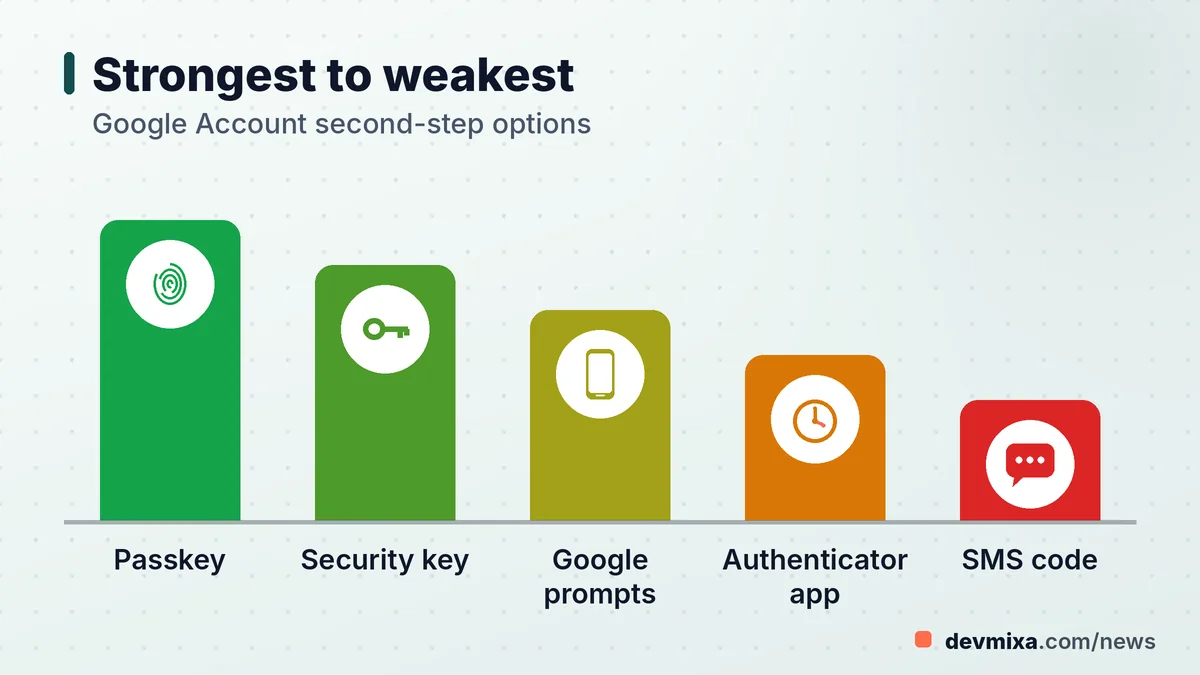
Google lists several options, and they are not equally strong. A passkey uses your fingerprint, face scan or screen lock and skips the second step entirely. Google prompts send a Yes or No tap to a signed-in phone with the Gmail, Google, YouTube or Photos app; Google recommends prompts if you do not use a passkey. An authenticator app generates codes offline. A hardware security key plugs in or taps. Text or voice codes are last, and Google itself warns they are more open to phone-number attacks. Treat SMS as the spare tyre, not the wheel you drive on.
Google Authenticator app setup for Gmail, plus the backup codes
Setup takes about two minutes. Install Google Authenticator (or another authenticator app) from the Play Store or App Store. In your Google Account, open Security & sign-in, then 2-Step Verification, then Authenticator, and choose to set one up. A QR code appears on the screen; scan it with the app, type the six-digit code it shows, and you are done. The codes refresh every 30 seconds and work without internet or mobile signal, which helps in a basement office or on a train through the Vindhyas.
Where backup codes live and how to keep them
The everyday search "backup codes for Google account where to find" has a short answer: on the same 2-Step Verification page, under Backup codes. Google gives you a set of 8-digit codes to print or download, and each code works once. Store them like a cheque book: a printed copy in the office locker and an encrypted note in a password manager. Do not keep them only on the phone they are meant to replace.
When the phone with your authenticator goes missing
Sign in from another device using a backup code, Google prompts on a second phone, or a security key. Then remove the lost phone from your account's device list and set up the authenticator again on the new handset. Recent versions of Google Authenticator can sync codes to your Google Account, which makes moving phones easier, but backup codes remain the safety net.
Passkey vs 2-Step Verification on a Google account
On passkey vs 2-Step Verification Google account security, the passkey is the strongest form of the same protection, not a rival to it. A passkey is a login stored on your phone or laptop and unlocked by fingerprint, face or PIN. It cannot be typed into a fake website, which is why phishing pages fail against it. Google's help page says signing in with a passkey skips the second step, and creating one opts you into a passkey-first sign-in, which you can change in settings.
Keep 2-Step Verification switched on anyway. It covers the moments when a passkey is not available, such as a borrowed laptop or an old browser.
Google 2-Step Verification without phone number codes
Many shop owners want to stop relying on a phone number, because a lost or swapped SIM can lock them out. You can push the number into a minor role. Add a passkey, an authenticator app and a security key, then rely on those. Google notes that a newly added 2-Step Verification number can take up to 7 days to be trusted, and it may disable a number that looks suspicious, so plan changes before you need them.
Two step verification for Google Workspace admin teams
Google now enforces 2-Step Verification on Workspace admin accounts itself, and admins can extend it to every employee. If your business email runs on Google Workspace, a super administrator opens the Admin console, then Menu, Security, Authentication, 2-step verification. Tick "Allow users to turn on 2-Step Verification", then choose an enforcement setting.
Enforcement can start immediately with On, or from a chosen date. Google says date-based enforcement can begin 24 to 48 hours after the date picked, so use On when timing matters. A new-user enrolment period, from one day to six months, gives fresh joiners time to set up their second step. Admins can also limit methods: allow any, block text and call codes, or require only security keys, which Google says includes passkeys. Before you block SMS, warn staff who rely on it, because they will be locked out.
A practical order for a ten-person firm: enable it for the admin first, then managers, then everyone, with a one-week enrolment window and a printed one-page guide on each desk.
The WhatsApp six-digit PIN and the email that rescues it
To switch on WhatsApp two-step verification, open Settings, then Account, then Two-step verification, and turn it on. Enter a six-digit PIN, confirm it, and add an email address you can open, or skip that step. Confirm the email and save. That PIN now guards your number: anyone who registers your WhatsApp on a new phone needs both the SMS code and the PIN.
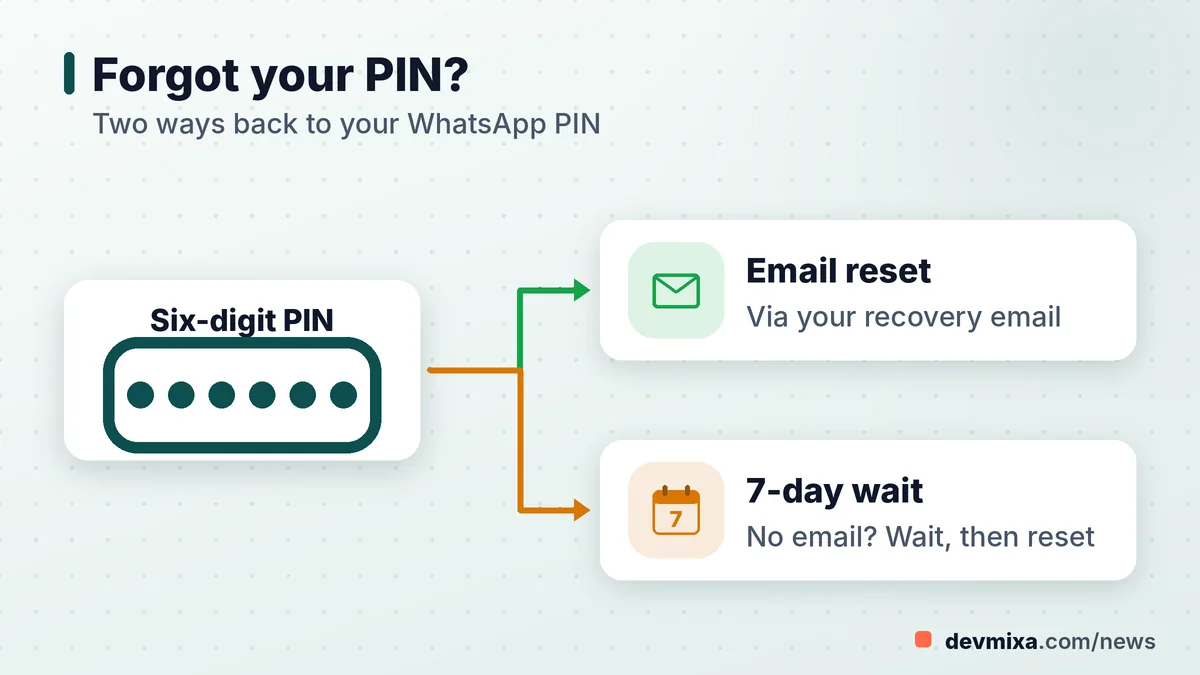
Do not skip the email. WhatsApp says the address is what lets you reset two-step verification if the PIN slips your mind. WhatsApp does not verify the address, so a typo quietly breaks your only reset route. Use an inbox you check, ideally one protected by its own second step.
WhatsApp two step verification PIN reset without email
The rule is blunt: you wait 7 days before you can reset the PIN, and WhatsApp says it cannot shorten that period. With an email on file, tap Forgot PIN and follow the reset link WhatsApp sends. A week is a long time when the number is your shop's order line, which is the best argument for adding the email today.
How to secure WhatsApp Business account from hacking
Protection starts with the same switch: in the WhatsApp Business app, open Settings, Account, Two-step verification, and set a PIN with a recovery email. The menu mirrors the personal app. A business number is a bigger prize, though, because customers trust it with payment screenshots and addresses, so add a few more habits.
- Check Linked devices every week and log out any laptop or browser you do not recognise.
- Keep the PIN with the owner, not with every staff member who answers chats.
- Never share the six-digit registration code sent by SMS, even with someone claiming to be from WhatsApp, your bank or a supplier.
- If the number is connected to the WhatsApp Business Platform through a provider, protect the Meta business portfolio behind it with 2FA as well.
- Keep the SIM in the owner's name and ask your telecom provider about a SIM lock or alerts for SIM replacement requests.
Think of the PIN as the shutter on the shop and the linked-device check as the evening walk around the building. Both take seconds, and both catch the obvious break-ins.
Facebook, Instagram and the business portfolio switch
Facebook and Instagram now share one security home, Accounts Centre. On Facebook, open Settings and privacy, then Accounts Centre, then Password and security, then Two-factor authentication, pick the profile and choose a method: an authentication app, SMS, or a security key. Prefer the app.
How to turn on 2FA on Instagram business account
The route is the same Accounts Centre: in Instagram, tap your profile, the menu, Accounts Centre, Password and security, Two-factor authentication, then select the business account and the method. Save the recovery codes Instagram shows. Repeat for every handle you manage, including the old one you rarely post from.
The Meta business portfolio two factor authentication requirement
This setting lets an owner make 2FA compulsory for the team. Meta renamed Facebook Business Manager to business portfolio, and the setting sits in Meta Business Suite under Settings, Business portfolio info, Business options, Two-factor authentication. Choose Admins only, Everyone, or No one. People covered by the rule must switch on 2FA before they can enter the portfolio. Pick Everyone if freelancers or agencies touch your ads.
Inside the OTP trick that hijacks Indian WhatsApp numbers
Picture a Bhopal sweet-shop owner receiving a message from a "friend": I sent a code to your number by mistake, please forward it. The six digits go out, and within a minute the account is registered on a stranger's phone. The new owner then messages every contact asking for urgent UPI transfers. The Quint reported this pattern in March 2025, and police cyber cells keep warning about it. A second variant, flagged by the Indian Cyber Crime Coordination Centre (I4C) in warnings reported in January 2026, tricks people into dialling a call forwarding code such as *401* followed by an unknown number, so the voice OTP lands with the fraudster.
Is SMS OTP enough given SIM swap fraud?
An SMS OTP is better than nothing, but a SIM swap, call forwarding or a convincing phishing call can steal it. Use app prompts, an authenticator app or a passkey for important accounts, and keep SMS as a fallback.
WhatsApp OTP scam account hacked recovery India steps
Victims should reinstall WhatsApp and register the number again; the SMS code logs the intruder out, unless they set a PIN, in which case the 7-day wait applies. For Gmail, use Google's account recovery page from a familiar device. Warn contacts, then report at cybercrime.gov.in or call the 1930 helpline, especially if money moved. For legal steps, consult your local cyber cell or a lawyer.
A one-evening 2FA checklist for your shop or startup
Set aside one evening, a cup of chai and every phone the business uses. Work down this list in order; most items take under five minutes.
- Write down every account that matters: Google Account, Google Workspace, WhatsApp and WhatsApp Business, Facebook, Instagram, the business portfolio, your bank, domain registrar and website hosting.
- Turn on Google 2-Step Verification, add Google prompts and an authenticator app, and create a passkey on your main phone.
- Download Google backup codes and store them in a password manager and in a locked drawer.
- Set the WhatsApp PIN on both apps and add a recovery email you actually use.
- Turn on 2FA for Facebook and Instagram through Accounts Centre, then set the business portfolio rule to Everyone.
- Enable 2FA on your hosting panel, domain account and website admin login. If you need help, our website maintenance and support team can review these for you.
- Review trusted devices and linked devices once a month, and remove anything stale.
- Brief staff: no one shares an OTP, a PIN or a backup code over chat or phone.
For more security explainers written for Indian businesses, browse our cybersecurity news section. Menus change from time to time, so confirm each step on the official help page before you start.
Frequently asked questions
Do I have to pay to turn on two-step verification?
No. Google 2-Step Verification, the WhatsApp PIN, Meta two-factor authentication and authenticator apps such as Google Authenticator are all free. The only optional cost is a hardware security key, which some businesses buy for owners and admins who handle money or customer data.
How often will WhatsApp ask me for my PIN?
WhatsApp may ask for your PIN from time to time on the same phone, as a memory check, and always asks for it when you register your number on a new device. The occasional prompt helps you remember a PIN you rarely type.
Can one authenticator app hold codes for many accounts?
Yes. A single authenticator app can store codes for Gmail, Instagram, Facebook, your hosting panel and dozens of other services. Each account appears as a separate entry. Keep backups or sync turned on so one lost phone does not take every code with it.
Will changing my SIM lock me out of Google?
Not if SMS is not your only method. If you also use Google prompts, an authenticator app, a passkey or backup codes, a new SIM changes little. Google says a newly added 2-Step Verification number can take up to 7 days to be trusted, so add methods early.
Do Meta ads accounts need 2FA?
Meta can require two-factor authentication for people working inside a business portfolio when an admin sets the requirement to Admins only or Everyone, and Meta may prompt some accounts to turn it on. For anyone who spends money on ads, switching it on is a sensible default.
How long is the WhatsApp PIN reset wait without an email?
Seven days. If you forget the PIN and did not add a recovery email, WhatsApp makes you wait 7 days before you can reset it, and its help page says the period cannot be shortened. With an email on file, the reset link arrives in your inbox.
Is it possible to switch two-step verification off later?
Yes. Each service lets you switch it off from the same security menu where you turned it on, usually after confirming your password. Doing so is rarely wise for a business account, and a Workspace or portfolio admin may block it if they enforce the rule.
Are Google prompts safer than SMS codes?
Generally, yes. A prompt appears only on your signed-in phone and shows details of the sign-in, while an SMS code can be stolen through SIM swap, call forwarding or a phishing call. Google itself warns that text and voice codes are more open to phone-number attacks.
Should my website hosting account have 2FA as well?
Yes. Your hosting panel and domain registrar control your website, email routing and DNS, so a hijack there can take your whole site offline. Most hosts offer authenticator-app 2FA in account settings. Turn it on for every login, including the developer or agency account.
Which number should I call to report cyber fraud in India?
Call 1930, the national cybercrime helpline, as soon as possible if money has moved, and file a complaint at cybercrime.gov.in. Quick reporting gives banks a better chance of freezing the transfer. You can also approach your local police cyber cell for help.
Planning a website, web app or SEO upgrade?
Tell us what you need. We reply within one working day with a clear plan and price.