


In this story11 sections
- What Google changed in its user-generated spam document on 26 October
- Google user generated spam guidance on shareable pages, in plain words
- Which platforms the new section is really aimed at
- How spammers turn open platforms into free billboards
- Robots meta tag vs robots.txt for noindex: choosing the right lock
- Setting noindex on WordPress, Apache and Nginx without breaking good pages
- Reading the warning lights in Search Console
- Platform metrics SaaS teams and AI site builders should alert on
- How to remove spam pages from Google index once they slip in
- A practical checklist for Indian site owners this week
- Frequently asked questions
Picture a free invoice maker, a quiz builder or a share-a-note app that wakes up to find Google has indexed 40,000 pages nobody meant to publish. On 26 October 2026, a new section titled "Only index content meant for Search" arrived in the Google user generated spam guidance. It tells platforms that let users create shareable pages, generated outputs or interactive tools to keep that content out of the index by default.
This is a change to a help document on Google Search Central, not a new rule in Google's spam policies. Still, it spells out a hard truth: if strangers can publish on your site, the index is your problem too.
| Item | Details |
|---|---|
| What changed | New section "Only index content meant for Search" in the document "Prevent user-generated spam on your site and platform", plus fresh monitoring advice |
| Who it affects | Forums, communities, hosting services, site builders, SaaS tools and any site with public user profiles or shareable pages |
| Key date | 26 October 2026 (listed in the Search Central documentation updates log) |
| Is it a policy change? | No. Google's spam policies page was not changed; this is updated guidance |
| Official source | Google Search Central documentation |
| What to do | Audit which user-created URLs can be indexed, apply noindex where needed, and watch Search Console for spikes |
What Google changed in its user-generated spam document on 26 October
Google updated one page: "Prevent user-generated spam on your site and platform", which lives on Google Search Central and now shows a last-updated date of 26 October 2026. The documentation updates log describes the change as updated guidance on blocking indexing of link-shared content and on monitoring abuse in Search Console.
Google's own summary says the changes "help platforms keep user-created pages that aren't meant for Search out of the index and detect spam earlier." Prevention comes from the new indexing section; early warning comes from expanded monitoring advice covering the Page Indexing report, the Search performance report and platform data.
A documentation update, not a new spam policy
Headlines that call this a "spam policy update" mislead readers. The spam policies page itself did not change in October. The 2026 policy changes were separate: a back button hijacking policy added on 13 April, and site reputation policy changes on 28 August. Think of the spam policies as the law and this document as the building's safety manual.
Google user generated spam guidance on shareable pages, in plain words
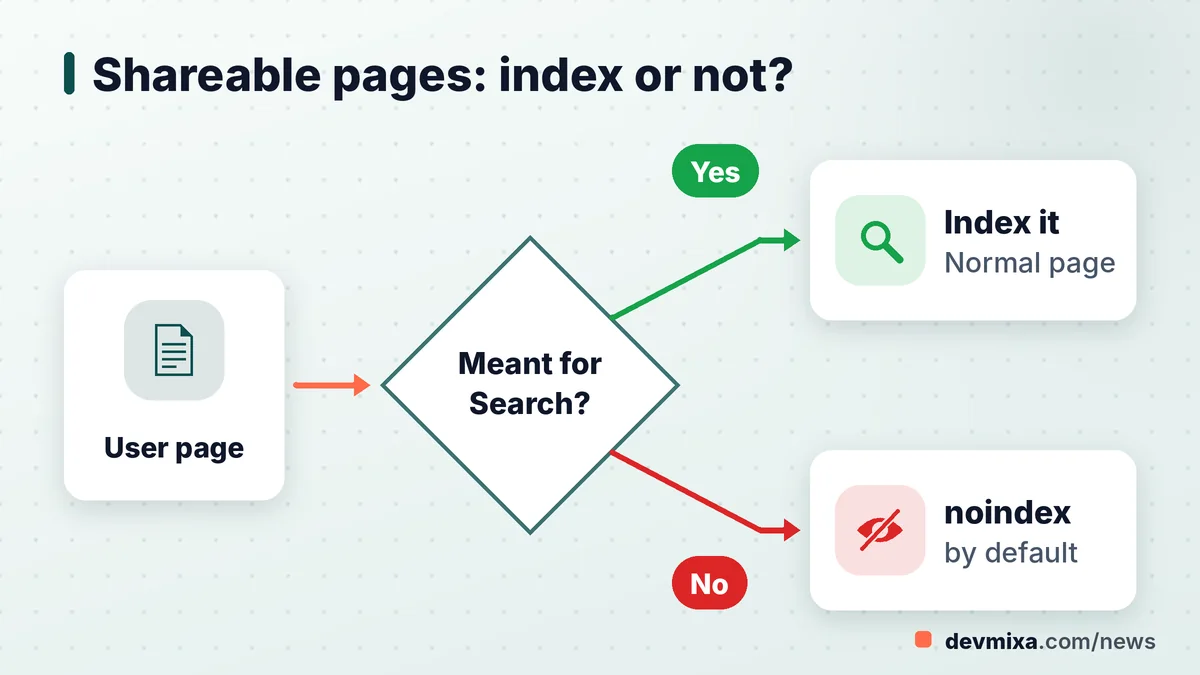
The new section boils down to one question every platform must ask before a page goes live: should strangers find this through Google, or only through the link the user shares? Google names three kinds of features to think about: shareable pages, generated outputs and interactive tools.
Link-shared content is anything a user creates to send to someone else. A shared shopping list, a generated resume preview, a collaborative whiteboard, a calculator result page or a one-off quiz score all count. They matter to the person holding the link and are usually noise to a searcher.
A search for "noindex link shared pages by default Google" now has a direct answer in the document itself. If a page exists to be shared, worked on together or used as a tool, it should start life with noindex, set through a robots meta tag or an X-Robots-Tag HTTP header, or sit behind a robots.txt block.
Why default rather than case by case? Because spammers count on the open door. A platform that indexes every new public URL hands them free hosting on a trusted domain. Flip the default, and a spammer who signs up gains a page that only people with the link will ever see.
Which platforms the new section is really aimed at
The guidance speaks most directly to services where users, not the site owner, create the URLs. That includes forums, Q&A communities, free hosting services, website and app builders, online tools that produce a shareable result, and any site with public user profiles.
Does a five-page business site need to worry?
Mostly no. A Bhopal clinic with a services page, a blog and a contact form does not create public pages for visitors, so there is little for spammers to grab. The risks start when you add features: an open comment box, a member directory, a job board where anyone can post, or a WordPress install that quietly lets anyone register.
Should forum and comment pages be indexed at all?
Good forum threads often deserve to rank. The guidance does not tell you to hide genuine discussion. It suggests a reputation approach instead: keep posts from brand-new users with no track record on noindex, then lift that as members earn trust. Thin threads, empty profiles and internal search result pages are a different story and are usually better kept out of the index.
How spammers turn open platforms into free billboards
Spammers want two things from your platform: your domain's reputation and a fast path into Google.
The patterns are familiar. Forum spam drops pharmacy or betting links into old threads. Comment spam fills blog posts with links to dubious sites, which is why Google still recommends rel=ugc or rel="nofollow" on links in user content. Fake user profiles carry a keyword-stuffed bio and an outbound link. On hosting services and site builders, abusers create spammy subdomains in their thousands, each one a disposable shopfront.
Google already treats several of these as policy breaches. Site reputation abuse covers third-party pages published to exploit a host's ranking signals. Scaled content abuse covers mass-produced pages made mainly to game rankings, whether written by people, scripts or AI.
Can user-generated spam drag down the whole site?
It can. Google's manual actions report has a specific action for user-generated spam, and it may apply to parts of a site or, in serious cases, more broadly. There is a quieter cost too: index bloat. When thousands of junk URLs compete for attention, Googlebot spends crawl budget on rubbish while your real pages wait.
Robots meta tag vs robots.txt for noindex: choosing the right lock
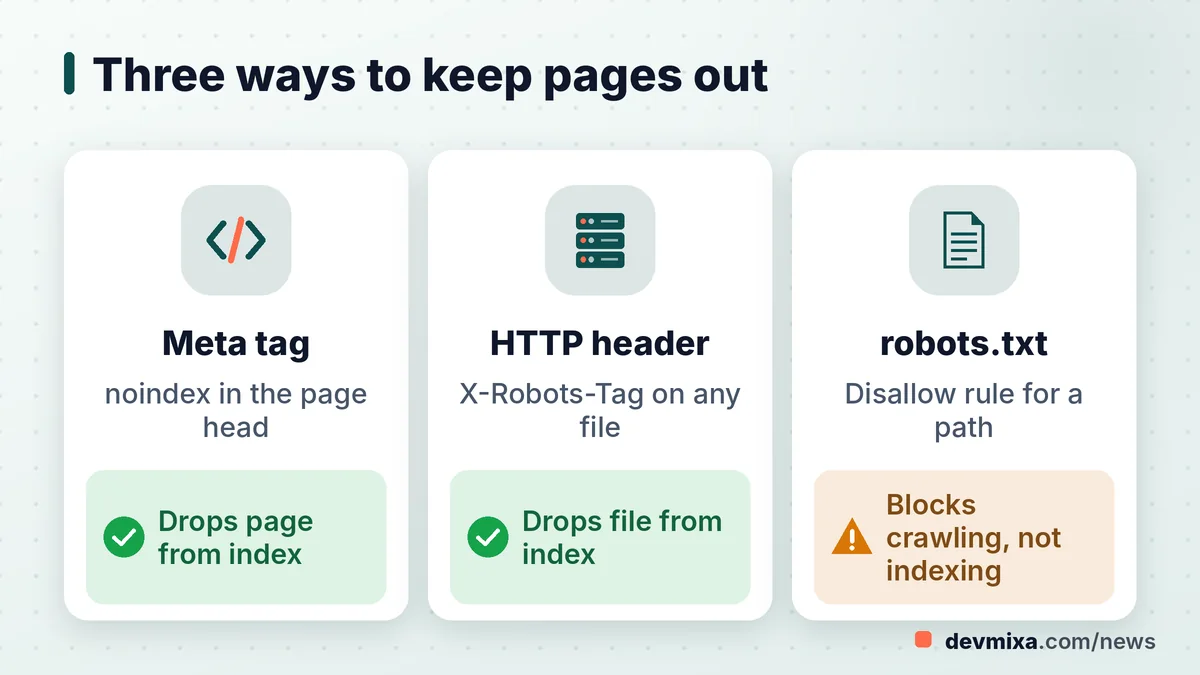
Use a robots meta tag or an X-Robots-Tag header when you want a page kept out of Google's index, and use robots.txt when you want Googlebot to stop fetching a section at all. They solve different problems, and mixing them up is one of the most common SEO mistakes we see.
A noindex rule works only if Google can crawl the page and read it. The meta version sits in the HTML head: a robots meta tag with content set to "noindex". The header version, X-Robots-Tag: noindex, travels in the HTTP response and also works for PDFs, images and other non-HTML files.
Robots.txt is a "do not enter" sign on the gate. Google respects it, yet a page behind that gate may still show up as a bare link with no snippet when other websites point to it. And because Googlebot never enters, it never sees a noindex tag placed on that page.
So when should you pick robots.txt? When the section has no business being crawled at all and saving crawl load matters more than removing URLs already indexed: endless filter combinations, auto-generated tool outputs or a staging folder. For anything already in the index that you want gone, noindex first, wait for Google to drop it, and only then consider blocking.
Setting noindex on WordPress, Apache and Nginx without breaking good pages
The safest setup applies noindex by page type, so a template change covers thousands of URLs while your service pages stay untouched.
How to noindex user generated pages in WordPress
Popular SEO plugins such as Yoast SEO and Rank Math let you set author archives, tag archives, attachment pages and internal search results to noindex from their settings screens. Internal search pages are a favourite spam target because anyone can craft a URL with a spammy query. With BuddyPress or bbPress, check member and topic pages too.
How to stop spam user profiles getting indexed
First, untick "Anyone can register" under Settings, General if you do not need open sign-ups. If you do, add a CAPTCHA such as reCAPTCHA to the registration form, keep profiles of new accounts on noindex, and remove the website field from public profiles. Google's document makes a related point about posts: noindex content from new users who have no reputation yet, which it says will greatly demotivate spammers. It also advises that once you find one spammy profile, you make it simple to remove the others, for example those coming from the same IP address.
X-Robots-Tag header noindex setup on Apache Nginx and LiteSpeed servers
On Apache with mod_headers, a LocationMatch block in the virtual host configuration wrapping Header set X-Robots-Tag "noindex" covers a whole path such as /share/. FilesMatch matches file names, not folders, so keep it for file types such as PDFs. On shared hosting with only .htaccess, pair a SetEnvIf Request_URI rule with Header set and an env= condition. On Nginx, add_header X-Robots-Tag "noindex"; inside a location block does the same. LiteSpeed reads most Apache rules. Test one URL with curl -I first.
Reading the warning lights in Search Console
Search Console is where user-generated spam usually shows up first, often weeks before anyone complains. Google's updated document asks platforms to verify their site or subdomain so they receive email alerts about manual actions and security issues, and to check two reports regularly.
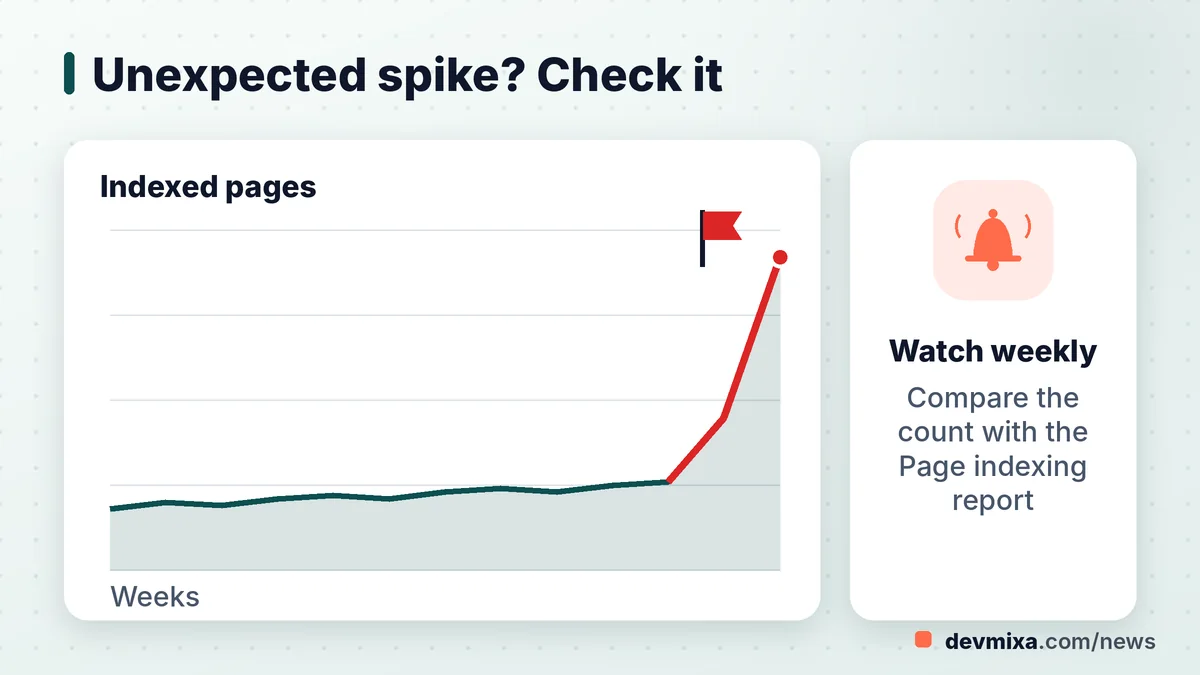
The first sign of trouble is often a sudden spike in indexed pages Search Console reports: a steep climb in the Page Indexing chart. Imagine a 600-product shop that suddenly shows 9,000 indexed pages: something is publishing pages nobody planned.
How to monitor Page Indexing report for spam every week
Open the report, note the indexed total, and compare it with what your sitemap says you publish. Sample the URLs and look for odd folders, random strings or foreign-language slugs. Then open the Search performance report, filter by query, and sort by impressions. Queries about casinos, loans or adult terms on a coaching institute's site are a clear warning.
Why every subdomain needs to be verified
A spammer may never touch your main site and instead fill forum.example.in or a user subdomain. Domain property verification through a DNS record covers every subdomain and both http and https in one go, so alerts and the security issues report reach you no matter where the abuse sits.
Platform metrics SaaS teams and AI site builders should alert on
Search Console data arrives with a delay, so Google also asks platforms to track their own numbers. In practice, that means counting how many public pages appear and get indexed, and raising an alarm when that count jumps or when a handful of users produce most of the indexable URLs.
For an Indian SaaS startup, that can be a simple dashboard: new public pages per day, pages per account, sign-ups per IP range. Google's document also lists signals such as unusually fast form completion, unexpected redirects, heavy ad blocks and large chunks of encoded JavaScript.
Could Google target AI tools and site builders with manual actions?
The document does not mention AI tools by name, and Google has not announced any new enforcement. The link comes from SEO commentators. On X, Marie Haynes asked whether this signals manual actions aimed at AI tools and app-building platforms, while Lily Ray pointed to AI chat sharing features and social tools that make indexable user content easy to churn out at scale. Treat that as informed speculation, not policy. AI site builders that publish user apps on shared subdomains are still the easiest fit for the new advice.
How to remove spam pages from Google index once they slip in
Clean the source first, then tell Google. Delete the spam content so the URLs return a 404 or 410 status, or apply noindex if the page type should exist but stay out of search. Then close the hole: registration settings, CAPTCHA, moderation and IP blocklists.
For urgent cases, the URL Removal tool (listed as Removals in Search Console) hides URLs from results for about six months, and you must own the property in Search Console to use it. If the page still exists without noindex when the six months end, it can return. Google's help page also warns against using robots.txt as a removal method.
The Google manual action for user generated spam fix
If the Manual actions report shows a user-generated spam action, the repair runs in a set order: find and remove the spam, put prevention in place, then file a reconsideration request that explains what you changed. Google's spam reports can feed manual actions too, which it clarified in April 2026. A vague request tends to fail, so document your clean-up with numbers.
Security and penalty problems vary from site to site. Confirm details on Google's official pages, and consult an experienced SEO professional if a manual action is involved.
A practical checklist for Indian site owners this week
You do not need a war room. One focused afternoon covers most sites.
- List every feature that lets visitors create a public URL: comments, profiles, forums, listings, share links, tool outputs.
- For each one, decide whether it is meant for Search. If not, set noindex by default.
- Check that pages you noindex are not also blocked in robots.txt, or Google cannot read the tag.
- Turn off open registration in WordPress if you do not need it, and add a CAPTCHA where you do.
- Add rel=ugc or nofollow to links in user content. Most CMS themes do this for comments already, but verify.
- Verify a domain property in Search Console so every subdomain is covered.
- Note your indexed page count today and compare it every week with the Page Indexing report.
- Scan the Search performance report for queries that have nothing to do with your business.
- Run a site: search on your domain with a few spam words to catch obvious junk.
If the audit turns up thousands of junk URLs or a manual action, it may be worth bringing in help with technical SEO or ongoing website maintenance and support. For more updates like this one, follow our web development news.
Frequently asked questions
Is a noindex tag the same as blocking a page in robots.txt?
No. A noindex rule lets Google crawl the page but tells it not to show the page in results. Robots.txt stops Google from crawling the page at all, so it never sees a noindex tag there. If outside links point to a blocked address, Google may still list it, just with no snippet underneath.
Will adding noindex to some pages cut my traffic?
Only if those pages were bringing useful visitors. Noindexing spam, thin profiles, tool outputs or internal search pages usually costs little real traffic, because those pages rarely match what searchers want. Check the Search performance report for each page type before you change it, and keep valuable forum threads or guides indexable.
How long does Google take to drop a page after noindex is added?
Google drops a page after it recrawls it and sees the noindex rule. For busy pages that can happen within days; for rarely crawled URLs it can take weeks or longer. Google sets no fixed timeline. You can use URL Inspection in Search Console to request a recrawl of important URLs.
Does rel=ugc keep a page out of Google's index?
No. The rel=ugc attribute applies to individual links, telling Google that a link sits inside user-generated content such as a comment or forum post. It does not stop the page itself from being indexed. To keep a page out of the index, use a robots meta tag or an X-Robots-Tag header with noindex.
Can the Removals tool in Search Console clear spam pages?
It can hide them quickly, but only for about six months, and only on properties you own in Search Console. For permanent removal, delete the content so the URL returns 404 or 410, protect it with a password, or add noindex. Use the tool as a stopgap while you clean up.
Where can I read Google's official advice on user-generated spam?
The page is titled "Prevent user-generated spam on your site and platform" and sits in the monitoring and debugging section of Google Search Central documentation. It was last updated on 26 October 2026. The documentation updates log on Search Central lists the change on the same date.
Is this connected to the August 2026 spam update?
Not directly. According to Search Engine Roundtable, the August 2026 spam update rolled out from 18 to 21 August, and another spam update ran from 24 September to 8 October. The 26 October change is a documentation update. All three relate to spam, but the guidance itself changes no ranking system.
Do Shopify or Wix store owners need to change anything?
Usually very little. Hosted builders control most technical settings, and a typical store does not let visitors publish pages. Check whether you run blogs with open comments, review apps that create public pages, or community features. Then look at your indexed page count in Search Console to confirm nothing unexpected is growing.
What exactly counts as user-generated spam?
It is spammy content that visitors, not the site owner, add to a site or platform. Common examples include fake profiles with promotional links, keyword-stuffed forum posts, link-filled blog comments and spam sites built on free hosting services. Google can take manual action when a site lets this pile up without control.
How often should I open the Page Indexing report?
A small business site can check monthly. Sites with comments, forums or member profiles should look weekly, and platforms where users create pages at scale should rely on daily internal alerts plus a weekly Search Console review. Any unexplained jump in indexed pages deserves an immediate look.
Planning a website, web app or SEO upgrade?
Tell us what you need. We reply within one working day with a clear plan and price.