In this story11 sections
- SSL certificate validity 200 days is already the ceiling, not a forecast
- Inside Ballot SC-081: who pushed for 47 days and how the vote went
- SSL certificate validity 100 days from March 2027, then 47 days in 2029
- Domain checks expire faster too: the DCV reuse squeeze
- What happens to the one-year or multi-year SSL you already paid for
- Let's Encrypt 45 day certificate change dates you should diary
- How to automate SSL renewal on cPanel hosting and beyond
- When renewal fails: browser errors, blocked checkouts and lost trust
- Free vs paid SSL after shorter validity
- How to monitor SSL certificate expiry dates, plus a 2026 to 2029 plan
- Frequently asked questions
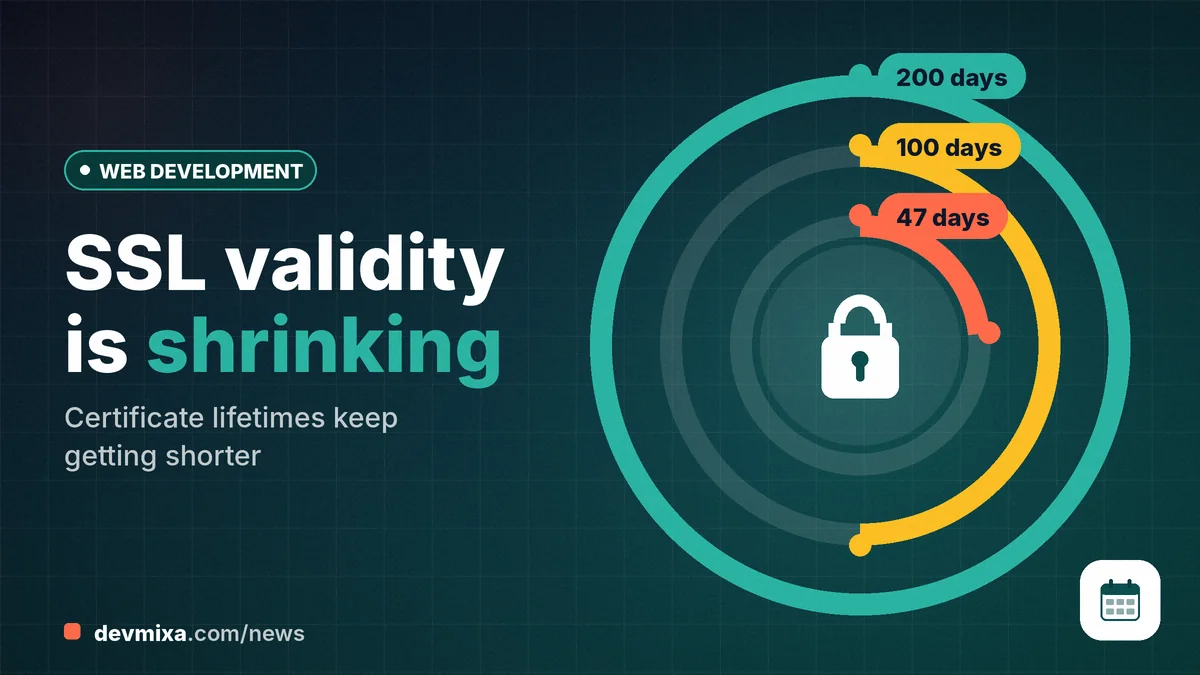
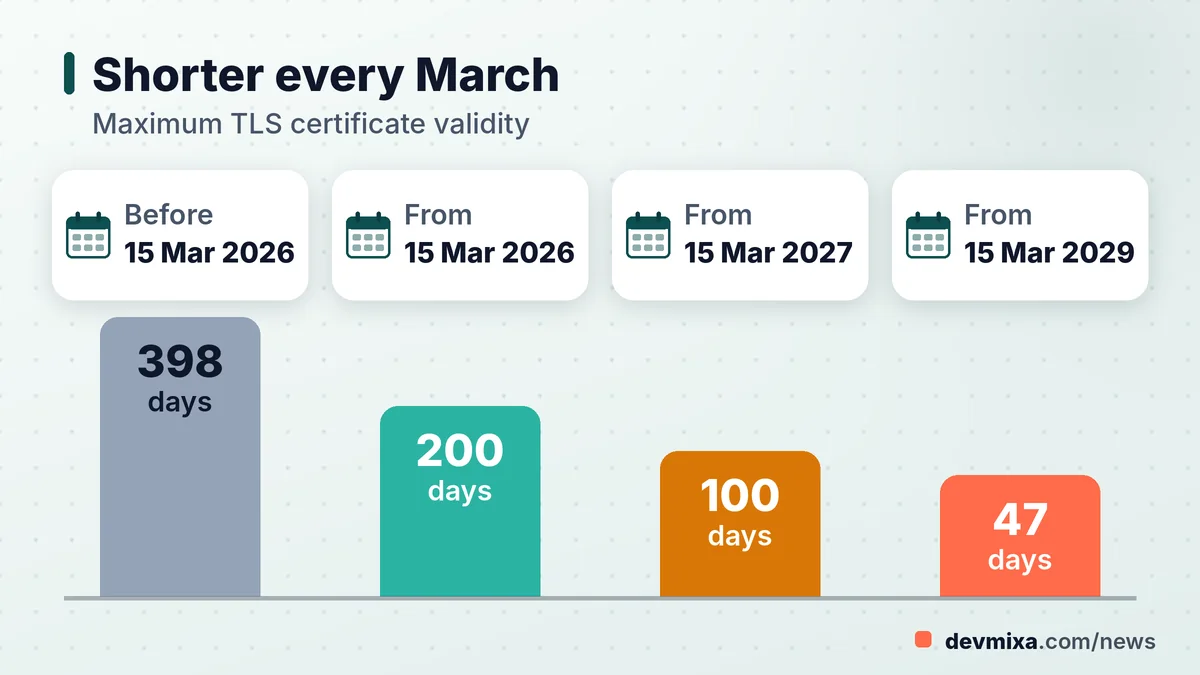
The padlock in your browser bar now comes with a shorter shelf life. Since 15 March 2026, SSL certificate validity 200 days has been the hard ceiling for every publicly trusted website certificate, down from 398 days. The next cuts are already scheduled: 100 days in March 2027 and 47 days in March 2029. For Indian site owners who renew by hand once a year, that habit has an expiry date of its own.
| Item | Details |
|---|---|
| What changed | Maximum TLS certificate validity cut from 398 to 200 days, with more cuts to come |
| Who it affects | Every website using a publicly trusted SSL/TLS certificate, free or paid, DV, OV or EV |
| Key dates | 15 Mar 2026: 200 days. 15 Mar 2027: 100 days. 15 Mar 2029: 47 days |
| Rule behind it | CA/Browser Forum Ballot SC-081v3, approved in April 2025 |
| What to do | List every certificate, switch on auto-renewal, add expiry alerts |
SSL certificate validity 200 days is already the ceiling, not a forecast
Yes, the 200-day limit is live, and it has been since 15 March 2026. Any certificate authority that wants browsers to keep trusting it can no longer issue a TLS certificate valid for more than 200 days. Before that date, the maximum validity period was 398 days, a figure that had stood since 2020. DigiCert says it began capping public TLS certificates at 199 days from 24 February 2026, one day under the forum limit as a safety margin.
Two clarifications save a lot of panic. First, the rule works on the issue date. A certificate issued before 15 March 2026 keeps its original expiry; nobody shortens it mid-term. Second, the rule covers public website certificates only. Code-signing certificates follow a separate track (GlobalSign says their maximum fell to 460 days from 1 March 2026), and email S/MIME certificates sit under their own CA/Browser Forum requirements rather than this ballot.
Why is my SSL certificate expiring in 6 months?
If your renewal this year arrived with an end date roughly six and a half months away, nothing went wrong. That is simply what 200 days looks like on a calendar. The certificate you were sold as "one year" now usually comes as two shorter certificates inside the same paid term.
Inside Ballot SC-081: who pushed for 47 days and how the vote went
Apple proposed the change, and the browser makers voted for it as a bloc. The CA/Browser Forum is the body where certificate authorities and browser makers agree on the baseline rules for website certificates. Ballot SC-081v3 was proposed by Apple, with endorsers from Sectigo, Google Chrome and Mozilla. Voting closed on 11 April 2025. Among certificate issuers, 25 voted yes, none voted no and 5 abstained. All four certificate consumers, Apple, Google, Microsoft and Mozilla, voted yes. You can read the full result on the CA/Browser Forum ballot page.
This was not a sudden idea. The Google Chrome Root Program had floated a 90-day maximum back in 2023, in its "Moving Forward, Together" roadmap.
Why browsers want certificates to live shorter lives
A certificate is a promise about who controls a domain, and that promise ages badly. Domains get sold, companies merge, servers get breached and private keys leak. Revocation, the system meant to cancel bad certificates early, has never worked reliably across browsers. Shorter lifetimes limit the damage window: a key stolen from a 47-day certificate is useful for weeks, while the same key on a 398-day certificate works for over a year. Short lives also speed up moves to new cryptography, including post-quantum algorithms.
SSL certificate validity 100 days from March 2027, then 47 days in 2029
The schedule moves in three steps, each landing on 15 March. The first step is behind us. The next arrives about four months after this story's publication, and the last one lands in a little over two years.
| Certificates issued on or after | Maximum validity | Domain validation reuse |
|---|---|---|
| Before 15 Mar 2026 | 398 days | 398 days |
| 15 Mar 2026 | 200 days | 200 days |
| 15 Mar 2027 | 100 days | 100 days |
| 15 Mar 2029 | 47 days | 10 days |
Read the middle column as a renewal frequency. At 398 days you touched a certificate once a year. At 200 days it becomes twice a year. At 100 days it is roughly every three months, and at 47 days it is close to eight times a year, more often in practice because sensible tools renew well before the last day. A calendar that once had one red circle will soon look like a railway timetable.
People searching "47 day SSL certificate what site owners must do" usually expect a complicated answer. It is short: stop renewing by hand. Manual renewal at that rhythm is not a plan; it is a countdown to the day someone forgets.
Domain checks expire faster too: the DCV reuse squeeze
Domain validation reuse is the period for which a CA may rely on an earlier check that you control a domain, and it is shrinking alongside validity. Domain control validation usually means placing a file on your server, adding a DNS record or clicking an email link. Under the old rules that proof lasted up to 398 days.
For anyone who typed "domain validation reuse period reduced CAB Forum" into a search bar, the numbers are stark. DCV reuse fell to 200 days in March 2026, falls to 100 days in March 2027, and drops to just 10 days in March 2029. In practice, by 2029 almost every renewal will need a new domain check, which is why automation that can answer those checks by itself matters so much.
Company identity checks for OV and EV certificates
There is a second, slower clock. For OV certificate and EV certificate orders, the CA also verifies your organisation, details known as subject identity information. The ballot cuts how long that verification can be reused from 825 days to 398 days, effective 15 March 2026. So a business buying OV or EV now has its company paperwork rechecked roughly once a year, separate from the more frequent domain checks. Keep your company contact details current with your CA.
What happens to the one-year or multi-year SSL you already paid for
Your money is not lost; what you bought was a subscription, and the certificate inside it simply gets replaced more often. The key distinction is between validity and subscription period. Validity is how long a single certificate file is trusted by browsers. The subscription is how long the CA or reseller has agreed to keep issuing certificates to you. Since 2020, multi-year plans have worked this way, and they still do.
DigiCert's own guidance is a good example. It says customers on its multi-year plans can keep reissuing certificates at no additional cost until the plan ends, even though each individual certificate is capped at 199 days. Other large CAs, Sectigo among them, sell similar bundles. The catch is labour, not money: each reissue means generating a request, passing validation and installing the new file, unless a tool does that for you.
Is buying multi year SSL still worth it?
It can be, if the plan comes with automated issuance and a locked price. A multi-year subscription protects you from price rises and saves you re-entering billing details. Without automated reissue, you are prepaying for a chore. Before you renew, ask your provider two plain questions: can this plan renew through ACME, and who installs the reissued certificate?
Let's Encrypt 45 day certificate change dates you should diary
Let's Encrypt, the free CA used by a large share of Indian small business sites, is shortening its certificates on its own schedule, which is stricter than the forum limit. Do not confuse the two numbers: the forum maximum will be 47 days in 2029, while Let's Encrypt moves from 90 to 45 days sooner.
- 13 May 2026: the opt-in tlsserver profile switched to 45-day certificates for early adopters.
- 10 February 2027: the default classic profile moves to 64-day certificates, with authorisation reuse cut to 10 days.
- 16 February 2028: the classic profile moves to 45 days, with authorisation reuse of just 7 hours.
Each change applies at your next renewal after those dates. Let's Encrypt also offers 6-day certificates through a separate shortlived profile for those who want them. Most free SSL users only need to confirm that renewal is automatic and not hard-wired to a 60-day cycle, which Let's Encrypt says will stop being enough.
What ACME means and why it matters now
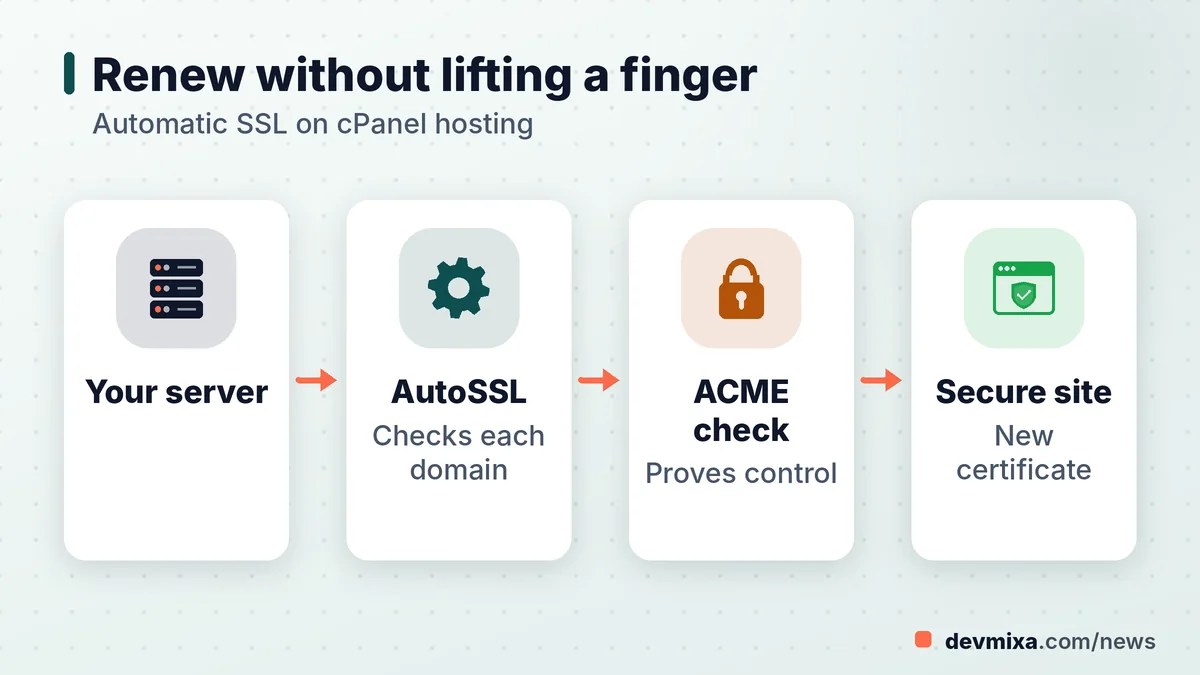
The ACME protocol is the standard language a server uses to ask a CA for a certificate, prove domain control and collect the result, all without a human. Certbot is the best-known ACME client. Let's Encrypt recommends clients that support ACME Renewal Information (ARI), which lets the CA tell your server when to renew. In February 2026 it also announced DNS-PERSIST-01, a validation method that lets you set one DNS record once rather than update it at every renewal; production was targeted for the second quarter of 2026, so check Let's Encrypt's own pages for current availability.
How to automate SSL renewal on cPanel hosting and beyond
On most cPanel hosting, automation is a switch you check rather than a project you build. Many shared and reseller hosts in India enable AutoSSL by default, which issues and renews free certificates through a provider chosen by the host, commonly Sectigo or Let's Encrypt. cPanel's own documentation says AutoSSL tries to renew Let's Encrypt certificates 29 days before expiry and cPanel-provided ones 15 days before.
- Log in to cPanel and open SSL/TLS Status.
- Confirm each domain and subdomain shows a valid certificate and is included in AutoSSL.
- Fix any domain marked as failing, usually a DNS record pointing elsewhere or a blocked validation file.
- Ask your host which AutoSSL provider is active and whether it is ready for shorter lifetimes.
Other setups already renew on their own too. Cloudflare Universal SSL certificates carry 90-day validity, and Cloudflare says it starts renewing them 30 days before expiry.
Automating paid OV, EV and wildcard certificates
Paid certificates can be automated too. Several commercial CAs, including DigiCert and Sectigo, now offer ACME endpoints for their paid products, so Certbot or a similar client can fetch a renewed OV, EV or wildcard certificate with stored account credentials. Wildcard certificates require DNS-based validation, so your DNS host must support API updates. Larger teams use certificate lifecycle management software across many servers.
When renewal fails: browser errors, blocked checkouts and lost trust
An expired certificate turns your website into a locked shop with a warning sign on the shutter. Chrome shows a full-page warning with the code NET::ERR_CERT_DATE_INVALID, other browsers show their own versions, and most visitors leave instead of clicking through. Payment gateways and APIs that call your server may refuse the connection outright, so online orders, UPI payment callbacks and app logins can fail silently.
The common search "SSL certificate expired website not secure fix" has a quick answer and a lasting one. The quick answer: issue a new certificate through your host panel or ACME client, install it, then restart or reload the web server. Check that the full certificate chain is installed, not just your own certificate, and that the server clock shows the correct date. The lasting answer is to make sure the same failure cannot happen at the next renewal.
A Not Secure warning can also appear on a valid certificate if a page loads images or scripts over plain HTTP, so fix mixed content as part of the same check. If your site handles payments or customer data, confirm requirements with your payment provider or a qualified security professional, and use the official CA/Browser Forum and CA pages as the final word on dates.
Free vs paid SSL after shorter validity
Shorter lifetimes weaken the main practical reason many small businesses paid for SSL: the convenience of renewing once a year. Every certificate, free or paid, now renews often, so the question becomes what else you get for the money. A Domain Validated certificate from Let's Encrypt encrypts traffic exactly as well as a paid DV certificate. Browsers show the same padlock for both, and they no longer give EV certificates a special green bar.
Paid certificates still earn their place in some cases. They include organisation checks for OV and EV, warranties, phone support, longer locked-in plans, and sometimes compliance paperwork that banks, government tenders or enterprise clients ask for. For a Bhopal bakery or a Pune clinic running a brochure site, free automated SSL on reputable hosting is usually enough. If a client contract asks for OV, buy OV, but buy it with automation.
Preparing agencies that manage dozens of client sites
Agencies feel the squeeze first, because one forgotten renewal multiplies across a client list. Build a single inventory of every domain, where its certificate is issued, who pays for it and how it renews. Move clients onto AutoSSL or an ACME client, and send alerts to a shared team inbox. If you would rather hand this work off, an ongoing website maintenance plan can include certificate checks.
How to monitor SSL certificate expiry dates, plus a 2026 to 2029 plan
Monitoring means knowing every certificate you own and getting an alert before any of them runs out. Start by finding them. Certificate Transparency search tools such as crt.sh list every public certificate issued for your domain, often revealing forgotten subdomains. Then add expiry monitoring through your uptime service, your host or a simple script, set to warn you at least 14 days before expiry, so you know when an automatic renewal has quietly failed.
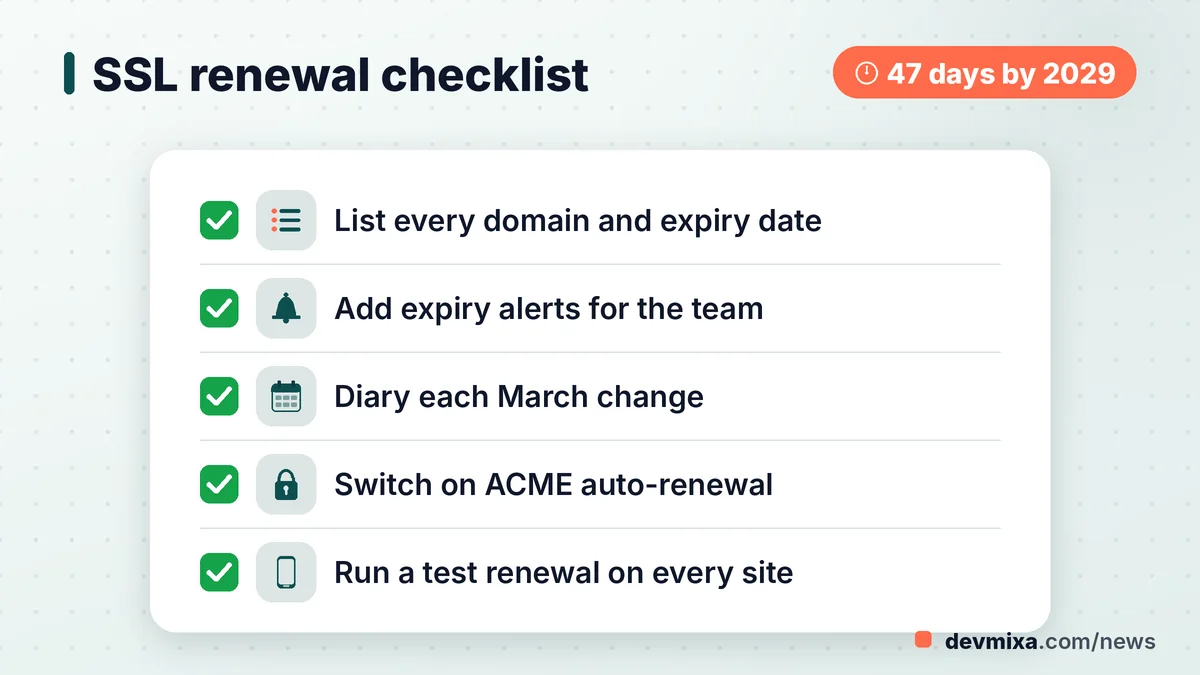
Here is a practical checklist for the next three years:
- This month: list every domain and subdomain, and note the issuer and expiry date of each certificate.
- By December 2026: turn on AutoSSL, Certbot or your CA's ACME option for every site; retire manual installs.
- Before February 2027: check that renewal schedules suit Let's Encrypt's 64-day certificates and are not fixed at 60 days.
- Before 15 March 2027: confirm paid OV and EV reissues work end to end for 100-day certificates.
- During 2027 and 2028: move DNS to a provider with an API so DNS validation can run unattended.
- Before 15 March 2029: run a test renewal on every site with 47-day certificates and 10-day DCV reuse in mind.
Treat certificates like your GST filing: predictable, recurring and painful only when missed. For more updates on hosting and web standards, follow our web development news.
Frequently asked questions
Is the 200-day SSL validity limit already in force?
Yes. The CA/Browser Forum limit of 200 days has applied to publicly trusted TLS certificates issued on or after 15 March 2026. Some CAs started earlier, with DigiCert capping certificates at 199 days from 24 February 2026. Certificates issued before the cutoff keep their original expiry dates.
Will SSL certificates become more expensive?
Not necessarily. The rule limits how long a certificate lasts, not what a CA charges. Many paid plans now include unlimited reissues during the subscription, and free options like Let's Encrypt remain free. The real extra cost is staff time if renewals stay manual, which is why automation matters.
Can I still buy a 2-year SSL certificate?
You can buy a two-year or longer subscription from many CAs and resellers, but not a single certificate that lasts two years. Under a multi-year plan, you receive a series of shorter certificates, each within the current maximum, and reissue them through the plan until it ends.
How often will I renew under the 47-day rule?
A 47-day maximum means roughly eight renewals a year, and often more, because good automation renews well before the final day, sometimes every month. Doing that by hand across several sites is unrealistic, so the practical answer is to let AutoSSL or an ACME client renew for you.
Does this apply to Indian CAs and SSL resellers too?
Yes. Browsers enforce these rules on every certificate authority they trust, wherever it is based. Indian resellers mostly sell certificates from global CAs, and those CAs must follow the schedule. A certificate that breaks the limits would not be trusted by Chrome, Safari, Edge or Firefox.
Will my site show Not Secure if renewal fails?
Yes. Once a certificate expires, browsers show a full-page security warning, such as Chrome's NET::ERR_CERT_DATE_INVALID error, and many visitors leave. Payment callbacks and apps that connect to your server may also fail. Expiry alerts give you time to fix a failed renewal before that happens.
Is Let's Encrypt safe for business websites?
Yes. Let's Encrypt is a publicly trusted, non-profit CA, and its certificates provide the same encryption strength as paid DV certificates. It does not verify your company identity or offer warranties, so pick a paid OV or EV certificate if a client, bank or tender specifically requires one.
Do I need a developer to set up auto-renewal?
Often not. On cPanel hosting with AutoSSL, or behind Cloudflare, renewal is usually already automatic and only needs checking. You may need a developer or your host's support team for a VPS, custom server, wildcard certificates with DNS validation, or paid OV and EV certificates installed on several machines.
What is the difference between validity and subscription period?
Validity is how long one certificate file is trusted by browsers, now at most 200 days. The subscription period is how long you have paid a CA or reseller to keep issuing certificates for you, which can still be several years. One subscription can cover many shorter certificates.
Does shorter validity actually improve security?
It narrows the window in which a stolen key or outdated domain check can be misused, and it reduces reliance on revocation, which browsers have struggled to make reliable. It also makes upgrading the web to new cryptography faster. The trade-off is more frequent renewals, which automation absorbs.
Planning a website, web app or SEO upgrade?
Tell us what you need. We reply within one working day with a clear plan and price.