In this story11 sections
- .IN domain KYC verification: what NIXI changed and why
- Who must verify, and the moments that trigger a fresh check
- How to complete .IN domain eKYC with DigiLocker, step by step
- Documents required for .IN domain KYC and the exact-name rule
- GoDaddy vs BigRock .IN domain KYC process and the days each allows
- What happens if .IN domain KYC fails: serverHold in plain words
- Getting a held .IN name back online after verification
- Disposable email not allowed for .IN domain contacts, and no VPN either
- Can foreigners register .IN domain after KYC rule changes?
- A compliance checklist for every .IN name your business holds
- Frequently asked questions
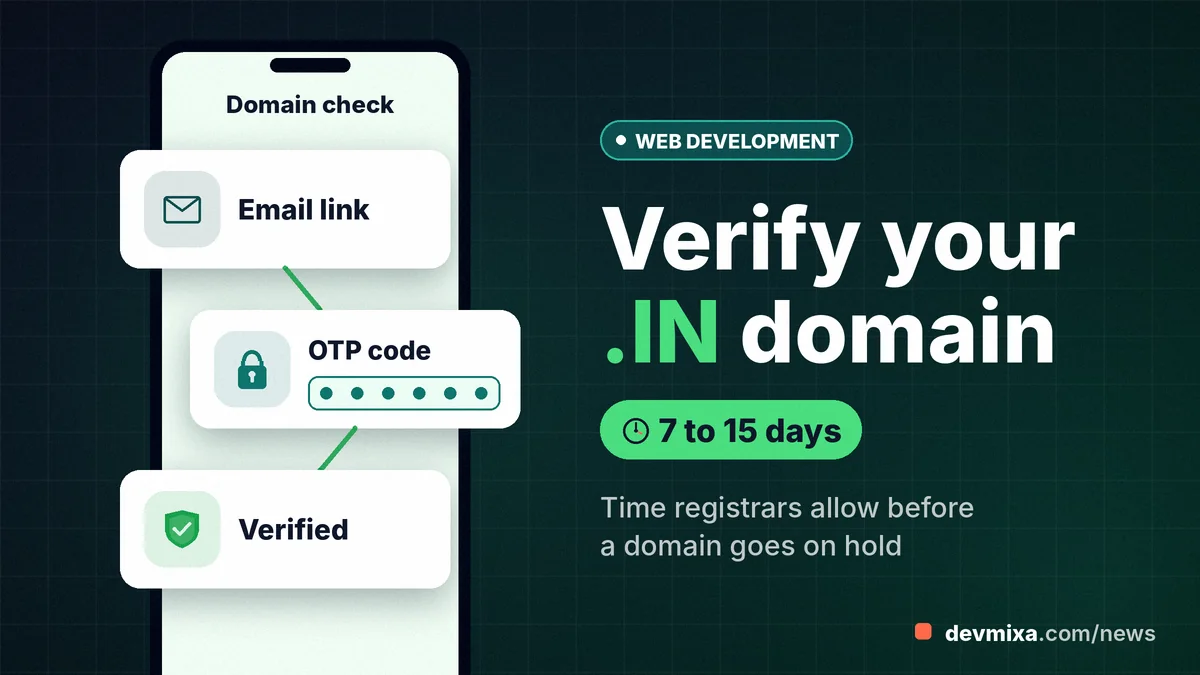
A small shop website in Bhopal can now drop off the internet because one OTP was never typed in. Since 31 March 2026, .IN domain KYC verification has been compulsory for holders of .IN, .co.in and .bharat names, old and new. Miss the window your registrar gives you and the registry parks the domain on serverHold, taking the website and its email offline until the check is done.
| Item | Details |
|---|---|
| What changed | Mandatory e-KYC and email verification for the registrant of every .IN domain |
| Who it affects | Individuals and companies holding .IN, third-level names such as .co.in, and .bharat |
| Key dates | Policy announced 29 July 2025 (per a registrar notice); compliance deadline 31 March 2026 |
| Time to finish | Set by registrar: 7 days at GoDaddy, 15 days at BigRock |
| If you miss it | Domain placed on serverHold; website and email stop until verified |
| Official source | .IN Registry (registry.in), run by NIXI |
| What to do | Log in to your registrar, match contact details to your ID, finish the DigiLocker check |
.IN domain KYC verification: what NIXI changed and why
NIXI now wants to know exactly who stands behind every .IN name, and it checks this through electronic identity verification rather than a form you fill once and forget. The National Internet Exchange of India (NIXI), the not-for-profit body under MeitY that runs the .IN Registry at registry.in, announced the updated policy on 29 July 2025, according to a notice from the Endurance group of registrars reported by TechnoDG. That notice set 31 March 2026, the NIXI new .IN domain policy 2026 deadline, for new and existing holders alike.
The idea is older than the rule. KYC for .IN was first raised in 2023, when it was voluntary, MediaNama reported. What changed in 2025 was the consequence: an unverified name now stops working.
Why push this at all? A NIXI source told MediaNama the aim is to let investigators trace a domain's owner after a cyber incident. A name tied to a verified person is a mask with the owner's name stitched inside, and that makes it far less useful to a fraudster.
Registrars did not all switch on the same day. MotherHost applied KYC to registrations and renewals from 1 August 2025, and RamenDomains said its changes took effect on 5 December 2025. When this story goes live on 7 November 2026, the deadline is more than seven months old, so any holder who has not verified should treat the task as overdue. Older domains usually get pulled in at renewal, at a contact change, or through a direct notice from the registrar.
Who must verify, and the moments that trigger a fresh check
The registrant must verify: the person or organisation named as owner in the domain record, not the freelancer who built the site or the colleague whose card paid the bill.
The .IN domain KYC on renewal and contact change
Registrar notices describe e-KYC at three points: registration, domain renewal and contact modification. BigRock's help page widens the list and says verification starts automatically when a .IN or .bharat name is registered, renewed, modified, moved or transferred. A domain transfer to another accredited registrar, or a new registrant contact after a partner leaves the firm, can each restart the process.
Treat it as a toll booth on a highway rather than a single gate at the entrance. You may pass through it several times in a domain's life. DomainIndia says renewal usually needs no fresh documents unless WHOIS details have changed or NIXI asks, while other registrars run the prompt again anyway. Your own control panel is the only reliable guide.
Domains registered in a company's name
When a private limited company or a partnership firm owns the domain, the business is the registrant and an authorised signatory completes the check. DomainIndia, which reviews documents itself, asks for one company proof (company PAN, GST certificate or certificate of incorporation) plus a personal ID for the signatory.
How to complete .IN domain eKYC with DigiLocker, step by step
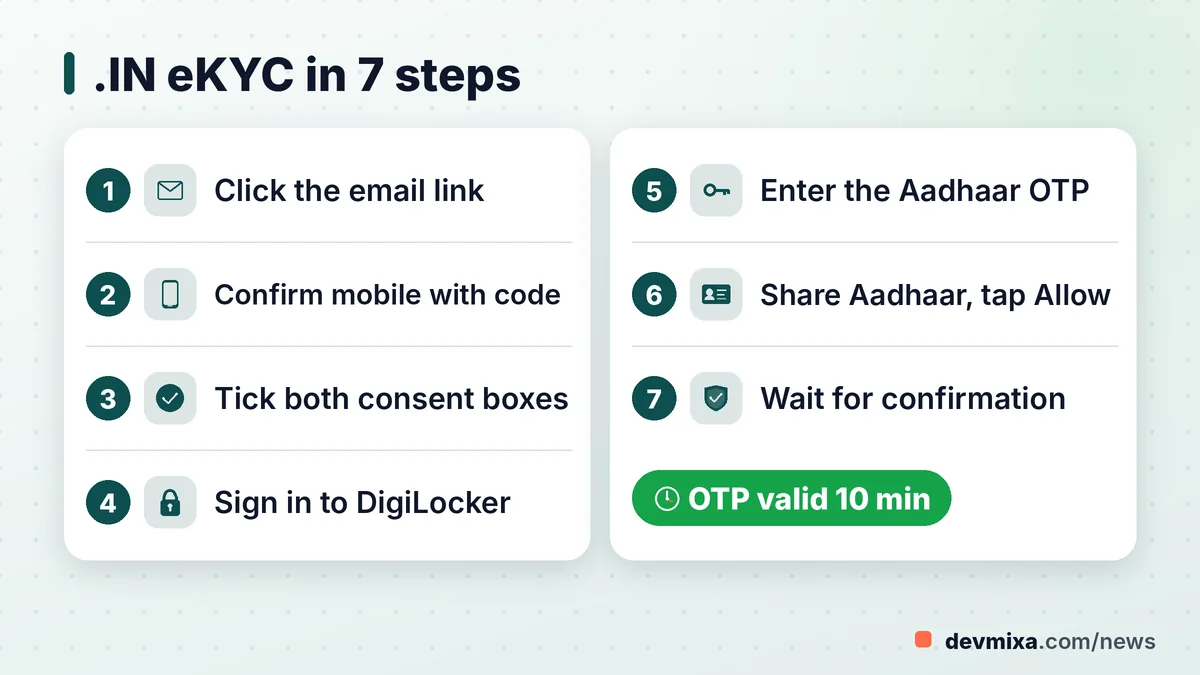
Most Indian registrants can finish the check in about ten minutes on a phone, as long as the mobile linked to Aadhaar is within reach. The flow below follows BigRock's published process, which uses Digio as the verification partner. GoDaddy starts the same idea from a Validate button in the domain portfolio and then hands you to DigiLocker.
- Confirm the email. A unique link reaches the registrant email ID. Clicking it completes registrant email verification, which is separate from e-KYC.
- Open the eKYC link. At BigRock, Digio sends it by SMS and WhatsApp to the registrant mobile. Confirm that number with a 6-digit code valid for 10 minutes.
- Give consent. Tick both consent boxes and allow Digio to fetch documents from DigiLocker.
- Sign in to DigiLocker. New users sign up with the 12-digit Aadhaar number; existing users use their PIN or an OTP.
- Enter the UIDAI OTP. It goes to the mobile linked with Aadhaar and is valid for 10 minutes.
- Share the Aadhaar card. Pick it from the list, read the purpose and validity of consent, then press Allow.
- Wait for confirmation. A completion screen appears. GoDaddy says processing can take up to 24 hours.
What DigiLocker does in this process
DigiLocker, the MeitY document wallet, works like a courier carrying a sealed envelope. It passes an issuer-signed copy of your Aadhaar to the verification partner only after you approve on the consent screen. No scans, no photocopies.
Documents required for .IN domain KYC and the exact-name rule
Aadhaar does most of the work. BigRock says only Aadhaar is used for its eKYC, even though PAN card and driving licence appear in your DigiLocker list, and GoDaddy's help page also points to Aadhaar through DigiLocker.
The wider rulebook is broader than these two flows. MediaNama reported that the existing Registrar Accreditation Agreement accepts a passport, voter ID, driving licence, Aadhaar, PAN card or another official ID. Registrars that review files by hand, such as DomainIndia, list PAN, passport, voter ID and driving licence next to Aadhaar. Which list applies to you depends on your registrar, not on what you happen to have in your wallet.
Does the registrant name have to match Aadhaar exactly?
Plan for an exact match. GoDaddy says registrant contact details must exactly match Aadhaar details, and it lets you edit contacts before you start. "R. Sharma" on the domain and "Rakesh Kumar Sharma" on Aadhaar is the kind of gap that stalls a check. Correct the name and address first, then verify.
How safe is your Aadhaar data here?
The consent screen spells out the purpose and how long consent lasts, and at BigRock the data goes to Digio and the registrar group, Newfold. None of the registrar notices we reviewed state how long records are kept, so ask your registrar for its privacy policy if that matters to you, and consult a legal professional for questions about data rights.
GoDaddy vs BigRock .IN domain KYC process and the days each allows
There is no single NIXI-wide countdown in the registrar material we reviewed, so the clock you face depends on where the domain sits. GoDaddy says KYC must be finished within 7 days of registration. BigRock sends reminders every 5 days and suspends the domain if both checks are still pending after 15 days. A Hogan Lovells note from August 2026 also describes a seven-day window after registering or renewing.
| Registrar | How it verifies | Window stated | Worth knowing |
|---|---|---|---|
| GoDaddy | Aadhaar through DigiLocker, from the Validate button | 7 days from registration | Processing can take up to 24 hours |
| BigRock | Email link plus Digio and DigiLocker Aadhaar | 15 days, reminders every 5 days | Restart from the Domain order section |
| DomainIndia | DigiLocker Aadhaar preferred, other IDs accepted | 7 days from registration | Company proof needed for organisations |
| Hostinger | Documents emailed to NIXI for held domains | Not stated | Reactivation "may take a few days" |
Smaller resellers often run their own portals or ask for scanned files by email. The sensible habit is to adopt the shortest window you have heard of, seven days, as your own deadline and to verify on day one.
What happens if .IN domain KYC fails: serverHold in plain words
If verification fails or never happens, the registry places the domain on serverHold, a status that tells the .IN Registry to stop publishing the name in DNS. The domain stays registered to you. It simply stops answering.
Picture a shop with its shutter down: the signboard stays, the door does not open. DNS resolution stops, so the website will not load, and email stops working because other mail servers can no longer find your mail records. For a clinic that takes appointment requests by email, or a saree store in the middle of a festive sale, that means website downtime and a silent inbox on the same morning.
Two similar statuses cause confusion. clientHold has the same effect but is set by the registrar, often over unpaid bills or abuse complaints. serverHold comes from the registry side, so if a WHOIS lookup on your .IN name shows it, an incomplete KYC is the first suspect. GoDaddy also mentions a separate "Locked For Contacts" status for invalid contact details.
Held is not deleted. Enom's support notes say NIXI does not delete domains that fail verification; they stay on hold until expiry, so renewing on time still matters. The registry uses the same lever elsewhere: a 2026 advisory on registry.in warns that names involved in auctions or speculative sale can go on server hold without prior notice.

Getting a held .IN name back online after verification
People who search '.in domain serverhold status how to remove' are usually staring at a dead homepage. The fix: finish the pending verification, then make sure the registry has recorded it.
- Find the pending task. Log in to the registrar control panel. BigRock lets you restart verification from the Domain order section of its Customer Control Panel; GoDaddy shows a Validate prompt in the Status column.
- Fix the record first. Make name, address and phone in the registrant contact match your ID before you begin.
- Complete both checks. Click the email link and finish the DigiLocker step in the same sitting.
- Escalate if the hold stays. Hostinger tells customers to email documents to support@nixi.in, including Aadhaar (front and back), business registration if the domain is in a company name, and the purpose of activation. GoDaddy gives the same address for its contact-lock cases.
- Allow time. Hostinger says reactivation may take a few days, and DNS caches can add some hours after the hold lifts.
Write from the registrant's own email, quote the domain name and ticket numbers, and keep the tone factual. Owners who prefer to hand this off can add domain status checks to a maintenance arrangement.
Disposable email not allowed for .IN domain contacts, and no VPN either
The rules shut out throwaway inboxes and masked connections because both defeat the point of knowing who owns a name. According to the registrar notice reported by TechnoDG, a registrant contact cannot use a throwaway or temporary email service, and nobody may hide behind a VPN or masked IP address while registering.
Renewal reminders, verification links and dispute notices must reach a real person, and a ten-minute mailbox is a letterbox painted on a wall. Location matters too, since eligibility for foreign registrants depends on their link to India, and a VPN hides exactly that. Switch off any office VPN before checkout and use an inbox you will still read in five years.
When the OTP or email link never arrives
The usual .IN domain KYC OTP not received fix is dull but effective. Start with the right phone: the UIDAI OTP goes to the number linked with Aadhaar, which may not be the one on the domain. Check both SMS and WhatsApp, since Digio uses both at BigRock. Codes expire after 10 minutes, so request a fresh one rather than reusing an old message. If nothing works, correct the contact number in your panel, restart verification, and raise a ticket with screenshots.
Can foreigners register .IN domain after KYC rule changes?
Yes, at many registrars, but a foreign registrant must meet a nexus requirement, and some Indian registrars no longer serve them at all. The Endurance notice reported by TechnoDG says that group now serves .IN customers in India only: registrations, incoming transfers and contact edits are open to Indian registrants alone, and names already held by foreign registrants are being shifted elsewhere. RamenDomains told customers outside India they may need to prove a connection to India or move to a registrar that accepts foreign registrants.
For documents, MediaNama reported that foreign citizens may be asked for a passport, a driving licence, a letter from an embassy or mission, and income tax returns for two years, while foreign entities sign a declaration of a genuine business connection to India. An NRI who holds Aadhaar and an active Indian mobile can usually take the normal DigiLocker route; one without Aadhaar should ask the registrar what it accepts.
If your web agency registered the domain in its own name
Then, on paper, the agency owns your brand online, and any KYC will verify its staff, not you. Ask it to change the registrant to your business or to transfer the name to an account you control. The change will trigger a check in your name, which is exactly what you want.
A compliance checklist for every .IN name your business holds
A domain is cheap to keep and costly to lose. Work through this list once now and again at each renewal, and confirm details on registry.in or with your registrar, since rules and registrar flows can change.
- List every .IN, .co.in and .bharat name you own, including old campaign and brand-protection domains.
- Run a WHOIS lookup on each and note any serverHold or clientHold status.
- Confirm the registrant is your person or company, not an agency or ex-employee.
- Match the registrant name, address and phone to the ID you will use.
- Replace any temporary or shared inbox with a long-lived address.
- Keep the Aadhaar-linked mobile handy before you start the DigiLocker step.
- Verify within seven days of any registration, renewal, transfer or contact change.
- Turn on auto-renew so a held name never quietly expires.
- Save screenshots of the completion screen and support tickets.
Building a new site? Ask your developer to register the domain in your name from the start; our website development team follows the same rule. For more registry and hosting updates, browse the web development news section.
Frequently asked questions
Is .IN domain KYC free?
None of the registrar notices we reviewed mention a separate fee for e-KYC; it is handled inside the normal registration or renewal flow. Be wary of anyone who sends a payment link for "domain verification". Start the process only from your registrar's own control panel or its official email.
How long does the verification itself take?
The DigiLocker steps usually take a few minutes if the Aadhaar-linked phone is with you. GoDaddy says processing can take up to 24 hours after submission. If the domain is already on hold and NIXI must review documents, Hostinger says reactivation may take a few days.
Do .co.in and other third-level names need e-KYC too?
Yes. The registrar notice reported by TechnoDG covers .IN, third-level .IN names and .bharat. DomainIndia lists .co.in, .org.in, .net.in, .ind.in and .firm.in among the extensions under the KYC rules, so treat every name ending in .in the same way.
Is there a way to verify without Aadhaar?
It depends on the registrar. BigRock and GoDaddy describe Aadhaar-only DigiLocker flows. Registrars that review documents by hand, such as DomainIndia, also list PAN, passport, voter ID and driving licence. Foreign registrants use passports and other papers. If yours accepts only Aadhaar, ask about alternatives or consider moving.
Will I have to repeat KYC every year at renewal?
Possibly. BigRock says verification starts automatically at renewal, and Hogan Lovells describes a seven-day window after registering or renewing. DomainIndia says fresh documents are usually not needed at renewal unless details changed. Expect a prompt, and keep your contact details unchanged to make it quick.
Can a .IN domain be transferred without completing KYC?
Do not count on it. BigRock lists transfers among the events that start verification, and the Endurance group allows only Indian registrants to transfer in. Finish KYC at the current registrar first, then expect a fresh check at the new one before the move is complete.
Does WHOIS display my Aadhaar details?
No registrar notice we reviewed lists Aadhaar as a WHOIS field. Aadhaar is shared through DigiLocker for verification, while WHOIS holds registrant contact data. DomainIndia notes that privacy or proxy WHOIS is not allowed for .IN, so keep the contact details accurate. Check your registrar's privacy policy for specifics.
Is a domain on serverHold deleted?
No. A serverHold switches off DNS but leaves the registration in your name. Enom's support notes say NIXI does not delete names that fail verification; they stay on hold until expiry. You still have to renew on time, otherwise the domain can lapse like any other unpaid name.
Can a Gmail address be the registrant email?
The ban covers disposable and temporary inboxes, and a regular Gmail account is neither. Use an address you control and will keep for years. One tip: avoid using an email on the same domain, because if that domain goes on hold, its inbox dies with it.
Whom should I contact if KYC keeps failing?
Start with your registrar's support team and share screenshots of each error. If the domain is held at the registry level, Hostinger and GoDaddy both point customers to support@nixi.in. Write from the registrant's own email, attach the requested documents, and keep a record of every ticket number.
Planning a website, web app or SEO upgrade?
Tell us what you need. We reply within one working day with a clear plan and price.