In this story11 sections
- What Google changed in Google Business Profile food ordering this October
- Preferred partners are old news; the off switch is the fresh part
- Switching off one delivery app without touching the others
- Five taps to crown a preferred partner for pickup or delivery
- Sending hungry clicks to your own ordering page
- What the Accept orders master switch hides on your listing
- When an app's link refuses to leave your listing
- Is the new control live in India, and what about Order with Google?
- The rupee maths of steering orders to your own site
- A Sunday-morning checklist for restaurant owners after this update
- Frequently asked questions
In late October 2026, Google handed restaurant owners a switch many had been asking for. Google Business Profile food ordering now lets a restaurant turn off individual delivery apps from its own dashboard, instead of waiting days for each app to pull its link. For an Indian kitchen whose listing shows Swiggy and Zomato by default, that means more say over where a hungry searcher lands, and how much commission follows the click.
| Item | Details |
|---|---|
| What changed | Restaurants can hide specific third-party ordering providers, separately for pickup and delivery, from the Business Profile dashboard |
| Who it affects | Restaurants, cafes, bakeries and cloud kitchens with a verified Business Profile |
| Key dates | Reported on 28 October 2026 (Search Engine Roundtable, Search Engine Journal) and 29 October 2026 (TechWyse) |
| India status | Not confirmed on an Indian dashboard by any source we found; check your own profile |
| Official source | Google Business Profile Help: Manage online ordering options |
| What to do | Review every provider listed under Food ordering, set a preferred partner, and add your own ordering link |
What Google changed in Google Business Profile food ordering this October
A restaurant can now switch off a particular ordering app on its listing by itself. Until now it could only ask: open Food ordering, press Remove link, and wait for that company to act. The news surfaced through a LinkedIn post by Lisa Landsman, whom Search Engine Journal describes as Google's Head of Industry Engagement and SMB Success. Search Engine Roundtable and Search Engine Journal both wrote it up on 28 October 2026, and TechWyse followed on 29 October.
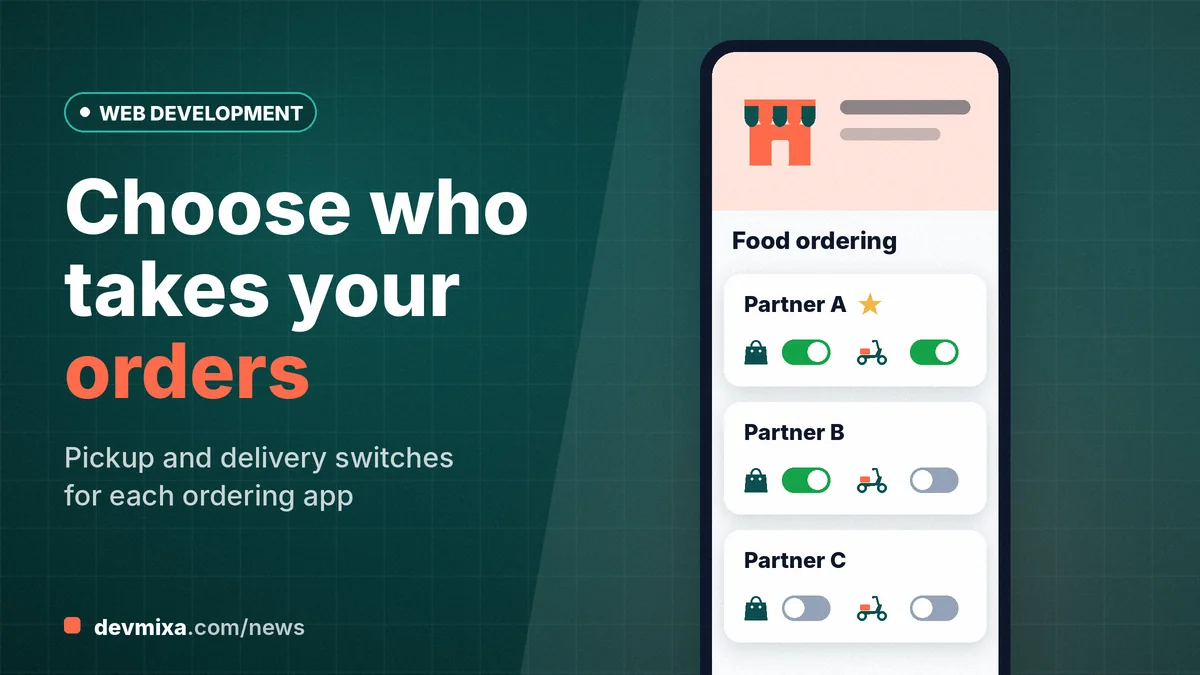
According to a screenshot published by Search Engine Journal, each provider now opens a "Manage provider" panel with two switches under "Show provider to customers", one for pickup and one for delivery. Flip one and that app disappears from that part of your listing on Google Search and Google Maps. US coverage named apps such as Uber Eats and DoorDash; in India the familiar names are Swiggy and Zomato.
Google's policy text, quoted by Search Engine Journal, says all partner integrations are enabled by default. The shop window was always stocked with other people's goods; now the owner holds the key to the display case. Google's Business Profile food ordering help page still did not describe the new switches when we checked on 4 November, so labels on your screen may differ.
Preferred partners are old news; the off switch is the fresh part
Setting a preferred provider is not new, even though plenty of recent posts present it that way. Google's help page on managing online ordering options has long explained how to mark one provider as preferred for pickup, for delivery, or for both. A preferred provider is the app Google puts forward first when a customer taps to order.
What arrived in October is the ability to hide a provider outright, without the provider's cooperation. The two tools work as a pair. One decides who stands at the front of the queue; the other decides who is allowed into the queue at all.
Landsman also offered a word of caution, as reported by Search Engine Journal. Fewer apps is not automatically better, she argued, because diners tend to order through apps where they already pay for a subscription or have a card saved. A customer with a Swiggy One or Zomato Gold membership may simply close the tab if their favourite app is missing.
So the smart reading of this Google Business Profile food ordering update is not "delete everyone". Cut the apps that bring you nothing, such as one you no longer list with, and keep the ones that do.
Switching off one delivery app without touching the others
To hide a single provider, open its management panel under Food ordering and turn off the pickup switch, the delivery switch, or both. Based on the screenshot Search Engine Journal published, the flow looks like this:
- Sign in with the owner or manager account and open your Business Profile on Google Search, in the Google Maps app, or at business.google.com.
- Select Food ordering to see every provider and link attached to the profile.
- Pick the app you want to hide and open its "Manage provider" panel.
- Under "Show provider to customers", switch off pickup, delivery, or both, and save.
This is the cleanest way to remove Swiggy Zomato link from Google Business Profile listings one app at a time. You might keep Zomato for delivery, for instance, but hide Swiggy because you have paused your account there, or the reverse.
If you do not see the new panel yet, the older route still exists. The help page says you can select the provider and choose Remove link, which sends a removal request to that company. TechWyse points out that the new switches have not been shown to replace this request process, so both may live side by side for a while.
Five taps to crown a preferred partner for pickup or delivery
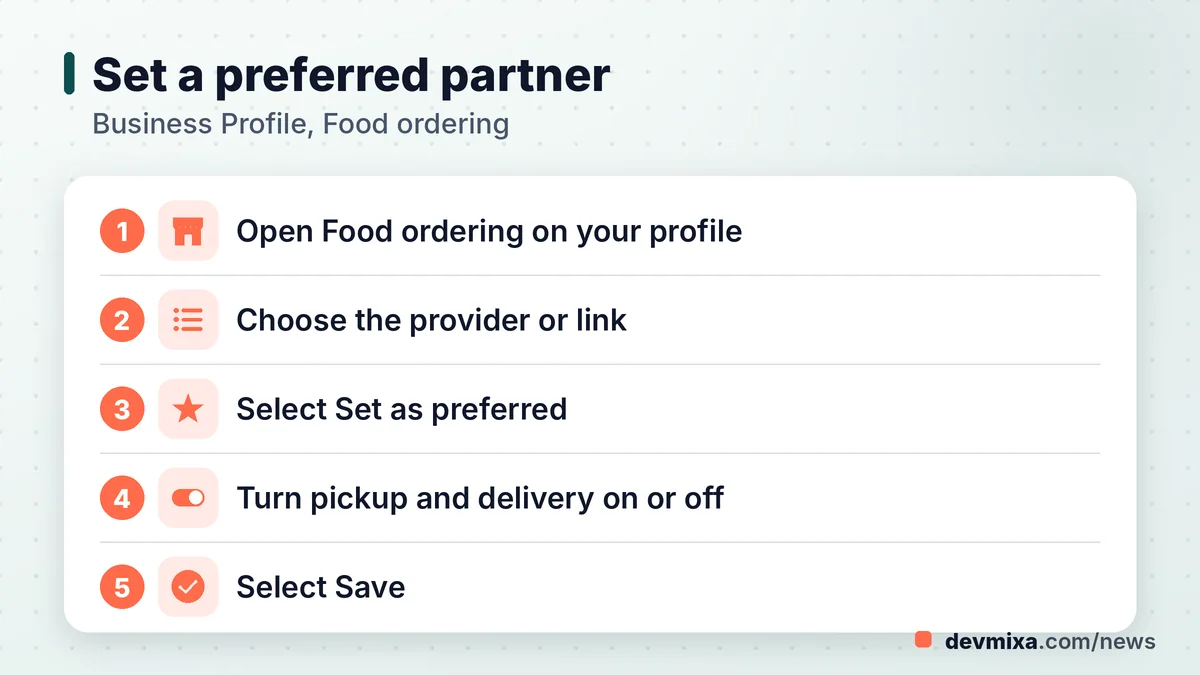
The preferred setting lives inside the same Food ordering screen, and it takes under a minute. To set preferred ordering provider Google Business Profile options, follow Google's own help page:
- Open your Business Profile and select Food ordering.
- Choose the provider or link you want to promote. To add a new one first, use Add a link at the bottom.
- Select Set as preferred.
- Turn Preferred for pickup on or off, and turn Preferred for delivery on or off.
- Select Save.
Think of the preferred for pickup and delivery Google setting as two separate switches rather than one. That design lets you choose different partners for each job. A cafe near a college might prefer its own website for pickup, where students collect a cold coffee on the way to class, and prefer Zomato for delivery, where it has no riders of its own.
Why the delivery switch sometimes refuses to move
Google's help page carries a tip that explains a common puzzle. A switch only works for a service the provider actually runs for you. If a partner handles only takeaway for your outlet, the Preferred for delivery switch stays stuck until the partner's service changes.
Sending hungry clicks to your own ordering page
If your restaurant has its own ordering website, you can list it directly on the profile with Add a link. Google's help page says custom links make it easy for customers to order from your business, and those links appear to customers as a Place an order link, or under the Order online button in some countries and regions.
The quickest way to add own website order link to Google Maps and Search is therefore the same Food ordering screen. Paste the full URL of the page where an order actually begins, not your home page. A customer who taps "order" and lands on a photo gallery is a guest led into the kitchen instead of the dining room.
Keep your menu link separate from your ordering link: one is for browsing dishes, the other for paying.
Once the link is added, use Set as preferred on it if you want Google to lead with your own site. A direct ordering website only works if it loads fast on a ₹10,000 phone over a patchy 4G signal, takes UPI, and confirms the order clearly. If your current site struggles with that, a focused website development fix often matters more than any listing setting.
What the Accept orders master switch hides on your listing
When you turn off Accept orders on your profile, customers stop seeing any ordering option at all: the partner apps go, and so does every link you added yourself. Google's help page says so plainly, and the effect is broader than many owners expect.
The Accept orders toggle sits at the top of Food ordering. It behaves like the main shutter of a shop: pull it down, and passers-by see nothing in the window, including your own posters.
When would you want that? A few honest cases:
- Your kitchen is shut for renovation for several weeks and you do not want customers placing orders that partner apps then cancel.
- You are changing ownership and need to clean up old accounts before the new team starts.
- You serve walk-in and dine-in guests only and do not want ordering buttons at all.
For anything narrower, use the individual provider switches instead.
Before you flip it, note which providers were active and which was preferred, in case the setup does not return exactly as you left it.
When an app's link refuses to leave your listing
If a provider will not drop its link, Google gives it a deadline and you a complaint route. The help page says providers must remove third-party links within 5 business days of your request. That is the third party ordering link removal 5 business days rule, and TechWyse notes that Google's compliance requirements set the same five-day window for partners whose service a merchant has suspended or ended.
If the link is still live after that, the help page points to a "report a violation" link. In plain terms, this is the report ordering provider violation Google form, hosted at support.google.com/business/contact/gmb_3p_complaints. Attach screenshots, the date of your request and the outlet name.
Order online button wrong link on Google? Start here
A button you never set up usually comes from third-party ordering providers with a Google integration, which can supply links for restaurants they serve. Google's developer documentation calls this partner programme Ordering Redirect. If the button leads to a closed outlet or an app you have left, the new switch is your first fix and the removal request your fallback.
This is general guidance, not legal advice. Confirm the current process on Google's official help page, and speak to a professional if a dispute with a partner involves contracts or money owed.
Is the new control live in India, and what about Order with Google?
Order with Google availability outside US markets is the first thing to clear up, because the two are often confused. Google's help page says US businesses can let customers order pickup or delivery directly through the Business Profile on Search and Maps. That native checkout is Order with Google. Businesses outside the US get an Order online button supplied by providers, or Place an order links that owners or providers add.
For India, that means your profile shows partner apps rather than a Google checkout. Ordering through Swiggy and Zomato from Google Search is not new either; Telecomtalk reported a "Place an Order" option offering both apps as early as August 2016.
The new per-provider switch is harder to pin down. When a commenter asked which countries have the setting, a Google product manager identified as Michael G. replied "all", according to Search Engine Journal. Google's help page, however, names no countries, and we could not confirm the panel on an Indian restaurant's dashboard before publishing. Treat India availability as likely but unconfirmed, and check your own screen.
What about ONDC? We found no Google statement that ONDC buyer apps such as Magicpin appear as integrated providers. You can still add any ordering page by hand with Add a link, including one powered by an ONDC partner.
The rupee maths of steering orders to your own site
Direct online ordering for restaurants to cut commission is the real prize behind these settings. The numbers explain why owners care so much about one button on a search result.
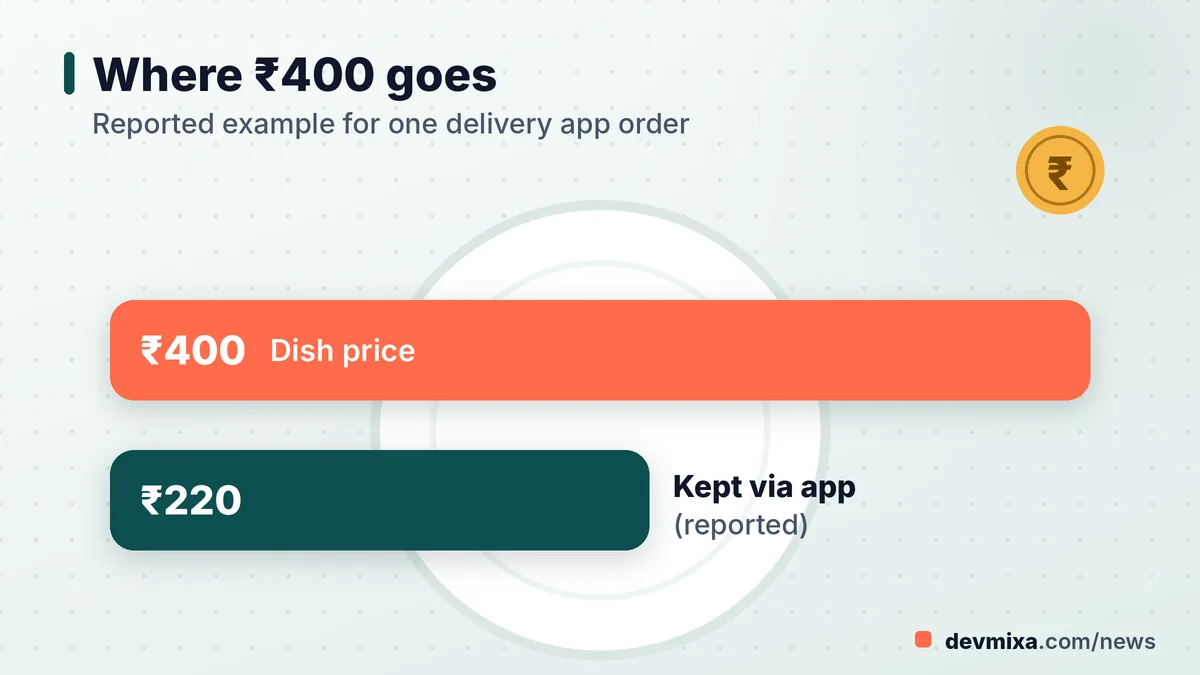
In July 2026, The Week reported a boycott threat by Bengaluru hoteliers over app fees. S Subramanya Holla, president of the Bruhat Bangalore Hotels Association, put platform commission at 8% to 28%, while the pricing tool foodcost.in cited a typical 24% to 25%. The same report worked through a ₹400 dish on which the restaurant kept roughly ₹220 after commission, taxes and other charges.
An order through your own site is not free either: there is a payment gateway fee, about 2% in the same report, and you must arrange delivery or offer pickup. Still, a customer who orders direct is one whose number you keep and whose next order carries no aggregator commission. Google Business Profile food ordering settings simply decide how often that customer finds your door.
Will hiding apps hurt your Google Maps ranking?
Google has not said that provider settings affect local ranking, and none of the reports we reviewed suggests it. Google's published local SEO factors remain relevance, distance and prominence, where reviews, hours and categories matter far more. For a deeper audit of those signals, a specialist local SEO review is a better use of effort than toggling apps on and off.
A Sunday-morning checklist for restaurant owners after this update
Set aside 30 quiet minutes before the lunch rush for a Google Business Profile food ordering review.
- See what customers see. Open a private browser window on your phone, search your restaurant name, and tap the ordering button on Search and in Google Maps. Note every app that appears for pickup and for delivery.
- Audit every outlet separately. Search Engine Journal could not confirm whether the new switches work in bulk or through the Business Profile API, so multi-location brands should check each restaurant listing one by one.
- Hide dead weight. Switch off apps you no longer use.
- Pick a preferred partner for pickup and for delivery, based on margin and on where your regulars already order.
- Add your own link if you have a working direct ordering page, and test a real order end to end.
- Match the details. Your hours, holiday closures, menu prices and dish names on Google should match what each partner app shows. A dish priced ₹180 on Google and ₹220 on an app invites angry reviews.
- Repeat monthly. New integrations switch on by default.
If you would rather hand this to someone, our maintenance and support team handles listing checks alongside website upkeep.
Frequently asked questions
Can I choose which delivery app shows on Google?
Yes, within limits. You can mark one provider as preferred for pickup or delivery, and recent reports say you can now hide specific providers from your Business Profile dashboard. Google still decides layout, and partner apps can supply links where they have an integration, so review the Food ordering list regularly.
Is setting a preferred provider free?
Google does not charge restaurants for managing a Business Profile or for choosing a preferred ordering provider. The costs come from the provider itself, such as commission on each app order or the gateway and delivery costs of your own website. Check each partner agreement for its current rates.
Can I hide all ordering buttons on my listing?
Yes. Turning off Accept orders on your profile under Food ordering hides every third-party ordering option and every link you added, according to Google's help page. Use it only when you want no online orders at all, because your own website link disappears along with the delivery apps.
Does Google take a commission on orders?
Google's help page does not describe any commission charged to restaurants for these ordering links. In India, customers who tap an ordering button usually complete the order on the partner app or your own site, and that partner's fees apply. Read your aggregator contract to know exactly what each order costs you.
Can I set different providers for pickup and delivery?
Yes. Google treats Preferred for pickup and Preferred for delivery as separate switches, so one partner can lead for takeaway and another for home delivery. You cannot turn on a role the provider does not offer for your outlet, so confirm the service is active on the partner's side first.
Where do I find the Food ordering menu?
Sign in with the account that manages your restaurant, then open your Business Profile from Google Search, the Google Maps app or business.google.com. Look for the Food ordering option among the profile tools. If it is missing, your business category may not support ordering, or your account may lack owner or manager access.
Do the changes show on both Maps and Search?
Google's help page describes ordering options appearing on your Business Profile across Search and Maps, and reports on the new switches say they control what appears in both. Updates may not appear everywhere instantly, so check again after a day using a signed-out or private browser window.
Can a cafe or cloud kitchen use these settings?
Any food business with a verified Business Profile and an eligible category should see Food ordering. That includes cafes, bakeries and many cloud kitchens. A delivery-only kitchen without a public address may have a service-area profile, so confirm on your own dashboard which options appear before planning around them.
Why is my own link not showing as preferred?
Adding a link does not make it preferred automatically. Open the link under Food ordering, select Set as preferred, turn on pickup or delivery, and save. If the switch will not move, the link may not be marked as offering that service. Changes can also take some time to reach customers.
Does this work in the Google Maps app for owners?
Google lets owners manage a Business Profile from the Google Maps app as well as from Search. Food ordering settings should be reachable there, though reporters documented the new provider switches from a dashboard screenshot. If you cannot find them in the app, try Search on a computer.
Planning a website, web app or SEO upgrade?
Tell us what you need. We reply within one working day with a clear plan and price.