In this story11 sections
- Core web vitals for small business, explained in plain words
- Do Core Web Vitals affect Google ranking, and do they move sales?
- The 75th percentile rule, and why 2026 brought no new thresholds
- Free tests that show how real visitors experience your pages
- Reading the Search Console report when it says Poor
- What slows the main image, and the WordPress fixes that help
- Chat bubbles, WhatsApp buttons and the price of a slow tap
- Why the page jumps on phones, and how to stop it
- Shared hosting in India and the server response problem
- A practical speed plan: what to fix yourself and what to hand over
- Frequently asked questions
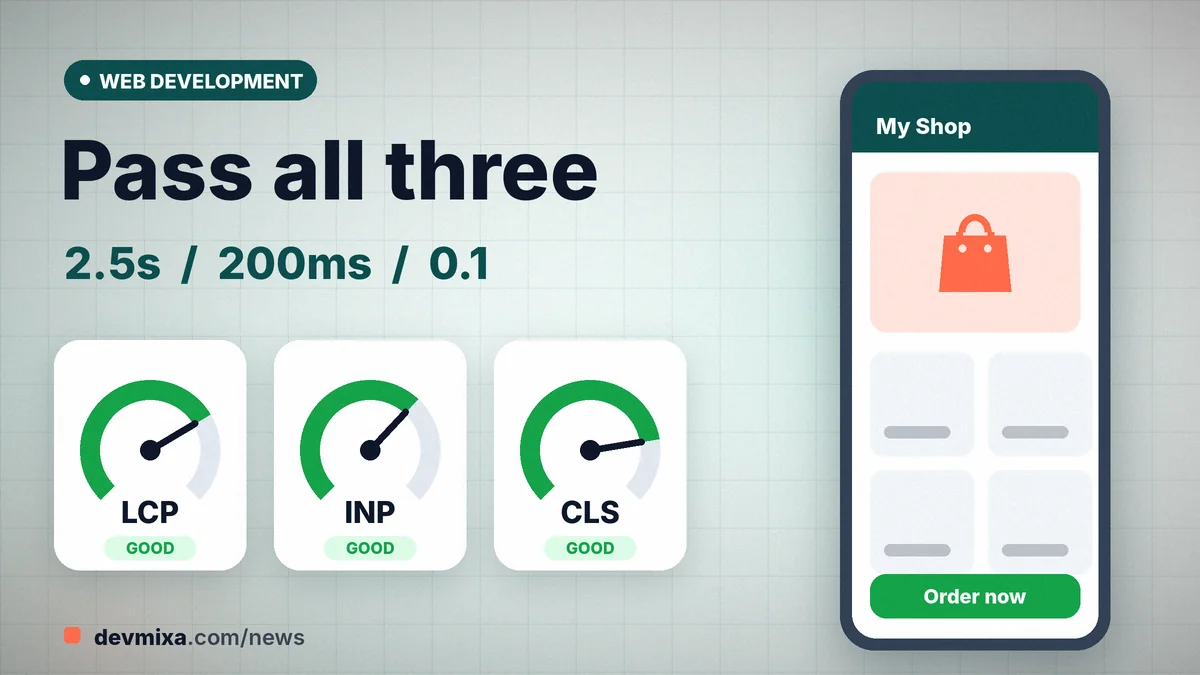
A customer opens your site on a budget Android phone, waits for the banner to appear, taps "Call now" and watches the button slide out from under her thumb. Google measures exactly those moments. Core Web Vitals for small business websites boil down to three scores, LCP, INP and CLS, and as of November 2026 the passing marks are unchanged: 2.5 seconds, 200 milliseconds and 0.1, judged on real visitors.
| Item | Details |
|---|---|
| What | Google's three Core Web Vitals: Largest Contentful Paint (loading), Interaction to Next Paint (responsiveness) and Cumulative Layout Shift (visual stability) |
| Who it affects | Any business, shop, clinic, coaching centre or startup with a website that gets visitors from Google |
| Passing marks | LCP 2.5 s or less, INP 200 ms or less, CLS 0.1 or less, at the 75th percentile of real page loads, measured separately for mobile and desktop |
| Key dates | INP replaced First Input Delay on 12 March 2024; no threshold change announced by Google when we checked on 4 November 2026 |
| Official source | Google's Web Vitals guide on web.dev and the Google Search Central documentation |
| What to do | Check the mobile report first, fix the slowest metric, then re-check monthly |
Core web vitals for small business, explained in plain words
Core Web Vitals are three measurements Google uses to judge how a real visit to your page feels: how fast the main content appears, how quickly the page reacts to a tap, and how steady the layout stays while it loads. Think of a shop counter: the shutter rolling up, someone answering your call, shelves that stay put.
LCP: when the main thing finally shows
Largest Contentful Paint times how long the biggest visible element, usually a hero photo, a product image or a large headline, takes to render. A good LCP is 2.5 seconds or less. Anything above 4 seconds counts as poor.
INP: how fast the page answers a tap
Interaction to Next Paint watches clicks, taps and key presses across the whole visit and reports one of the slowest delays before the screen visibly responds. Good is 200 milliseconds or less, and poor is anything over 500. INP took over from First Input Delay because FID only timed the wait before the very first interaction started. It ignored processing, repainting and every later tap.
CLS: whether the page sits still
Cumulative Layout Shift scores unexpected movement of content. Good is 0.1 or less, and above 0.25 is poor.

Do Core Web Vitals affect Google ranking, and do they move sales?
Yes, Core Web Vitals do affect Google ranking, but modestly, and relevance still comes first. Google's Search Central documentation states that Core Web Vitals are used by its ranking systems, and in the same breath says Search "always seeks to show the most relevant content, even if the page experience is sub-par." Good scores do not guarantee the top spot. Google describes page experience as something that helps most when several useful pages compete for the same query.
With Core Web Vitals for small business pages, that competition is very real. Picture three dental clinics in the same Bhopal neighbourhood, each with a similar services page. When content and reviews are close, a fast, steady page is one more reason to show yours. It works like a tie-breaker: it rarely decides a contest alone, yet it settles close ones.
The bigger reason to care sits outside rankings. A visitor who stares at a white screen leaves before reading your offer, and a slow page tends to push up your bounce rate. A form that freezes on "Submit" loses the enquiry you paid an ad to get. Google also uses mobile-first indexing, which means the phone version of your site is the one it mainly reads, and in India most of your customers will be on phones too. If search visibility is your wider goal, speed work fits best inside a broader SEO plan rather than replacing one.
The 75th percentile rule, and why 2026 brought no new thresholds
The 75th percentile rule means a page passes only when at least three out of every four real visits meet each target. Line up a hundred visits from slowest to fastest. If the visit in 75th place loaded its main image within 2.5 seconds, your LCP passes; the slowest quarter is allowed to miss. A page needs all three metrics to clear that bar, and Google judges mobile and desktop visits separately.
The core web vitals passing scores for mobile are the same numbers used for desktop: LCP of 2.5 seconds or less, INP of 200 milliseconds or less and CLS of 0.1 or less. The numbers do not bend for slower phones.
So did Google change Core Web Vitals thresholds in 2026? We found no sign of it. Several blogs this year have claimed that "Google changed the rules," but none points to a Google announcement. The web.dev vitals guide, last updated on 31 October 2024, still lists the same three metrics and targets. Google's Search Central pages on Core Web Vitals and page experience, updated in December 2025 and September 2026 respectively, describe the same set. web.dev also explains that stable metrics change at most once a year and are documented in a changelog. Before acting on a "new rules" headline, confirm it on Google's own pages. We track updates like this in our web development news section.
Free tests that show how real visitors experience your pages
You can check your Core Web Vitals for free with PageSpeed Insights, Google Search Console, Chrome DevTools and Lighthouse, and none of them needs a paid plan.
PageSpeed Insights field data vs lab data
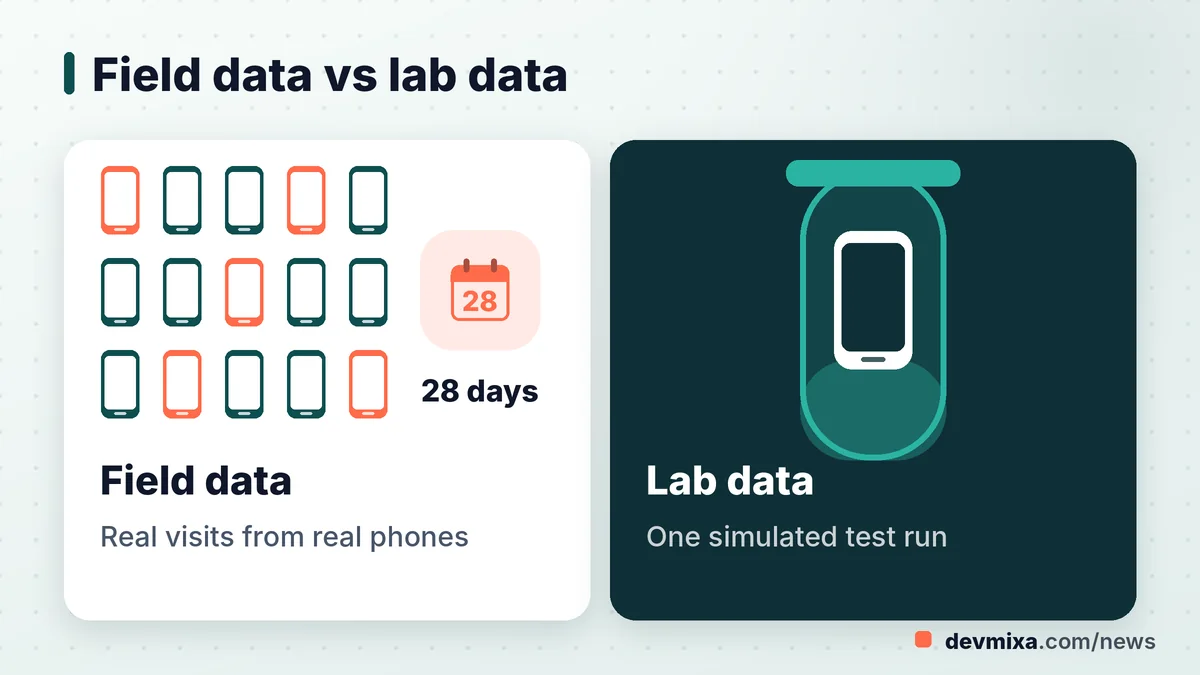
The first block in PageSpeed Insights is field data. It comes from the Chrome UX Report, or CrUX, which gathers anonymised timings from real Chrome visitors over a trailing 28-day window and refreshes daily. This is the block that decides whether you pass. The lower block is lab data: a single Lighthouse run that simulates a mid-range phone on a throttled mobile network from a Google data centre. Lab results are useful for debugging, but they describe one imaginary visit. Lighthouse also cannot measure INP at all, since nobody taps during a lab run, so it reports Total Blocking Time as a stand-in.
Why desktop passes and mobile fails
The same page often passes on desktop and fails on mobile because phones have slower processors and patchier networks, while desktop visitors tend to sit on office broadband. Heavy JavaScript execution that a laptop shrugs off can stall a phone. Treat the mobile result as the honest one.
Reading the Search Console report when it says Poor
To check Core Web Vitals in Google Search Console, open your property, go to Experience, choose Core Web Vitals, and then open the Mobile or Desktop report. The Search Console Core Web Vitals report does not list every page. It groups similar URLs that share an experience and shows one example address per group, with a status of Good, Need improvement or Poor. A group takes the status of its worst metric, so one bad CLS score can drag down an otherwise quick set of pages. Only indexed URLs appear, and the data is again drawn from CrUX over the last 28 days.
After a fix, click Start tracking on the issue. Search Console then watches the next 28 days of real-user data and marks the issue fixed only if no affected URLs show up during that window.
Plenty of owners type "core web vitals assessment failed what it means" into Google after seeing a red banner in PageSpeed Insights. "Failed" means at least one of the three metrics missed its good target at the 75th percentile of real visits. It is not a penalty notice and your site has not been blacklisted. It is a pointer to the metric worth fixing first.
What slows the main image, and the WordPress fixes that help
On most small business sites, a slow LCP comes from four places: an oversized hero image, a slow server, render-blocking resources in the page head, and sliders that load several large photos before showing one. A 4 MB banner straight off a phone camera is a lorry trying to squeeze through a gali; it gets there, eventually.
How to improve LCP on WordPress site templates
Start with the hero image. Resize it to the largest width your layout actually shows, apply image compression and serve it as WebP. Then check that the hero is not lazy-loaded: lazy loading is excellent for photos further down the page, but applied to the main banner it tells the browser to wait on the one image that matters most.
Next, add one well-configured caching plugin. LiteSpeed Cache suits hosts that run LiteSpeed servers, and paid options such as WP Rocket work on most hosts. Never run two caching plugins together, since they fight over the same files. An image optimiser plugin can convert existing uploads to WebP in bulk. Limit web fonts to one or two families and the weights you really use, and remove plugins you no longer need; each one can add CSS and scripts to every page.
Chat bubbles, WhatsApp buttons and the price of a slow tap
Chat widgets, WhatsApp buttons, ad tags and tracking pixels hurt INP because each adds JavaScript that competes for the phone's main thread at the very moment a visitor taps. If a chat script is busy waking up, the tap on "Book appointment" waits in the queue, like a receptionist juggling three phones while a walk-in customer stands at the desk.
What is INP and how to fix it on a busy page
INP is the delay between a tap and the next visible change on screen, so fixing it means clearing the queue. List every third-party script on the site: live chat, pop-up builders, heatmaps, social feeds, multiple analytics tags and ad code. Remove anything nobody has checked in months.
For what stays, delay non-essential scripts until after the page loads or until the visitor first scrolls or taps; most WordPress performance plugins offer a "delay JavaScript" option. A WhatsApp button can be a plain link to a wa.me address with a small icon rather than a full widget that loads its own code.
For deeper problems, record a tap in the Performance panel of Chrome DevTools. Long tasks show up as red-flagged blocks, and a developer can break them into smaller pieces or move work off the main thread.
Why the page jumps on phones, and how to stop it
Images without width and height tell the browser nothing about how much room to keep, so text paints first and then gets shoved down when the picture finally arrives. That shove is layout shift. On a narrow phone screen it is worse, because a single image can be taller than everything else in view. A customer reaching for "Add to cart" on a sweet shop's order page can land on "Remove" instead.
How to fix CLS layout shift on mobile screens
Begin with image dimensions. Every image tag should carry width and height attributes, or the CSS should set an aspect ratio, so the browser reserves the right-sized box before the file loads. WordPress adds these automatically for images inserted through the editor, but theme sliders, logos and images pasted in custom HTML often lack them.
Next, reserve space for anything that arrives late: ad slots, YouTube embeds, maps and review widgets. Avoid inserting offer bars or cookie notices above existing content after load; overlay them at the bottom of the screen instead. Web fonts cause quieter shifts when a fallback font swaps for the real one at a different size. Using fewer font files, preloading the main one and choosing a fallback with similar proportions keeps the text steady.
Shared hosting in India and the server response problem
Cheap shared hosting can hurt Core Web Vitals, mostly through slow server response time, which delays everything that follows, including LCP. The browser cannot start drawing your hero image until the server sends the page. That first wait is measured as Time to First Byte, and web.dev's guidance treats roughly 0.8 seconds or less as a good TTFB. On an overcrowded shared server, one neighbour's traffic spike can eat into your share of memory and CPU at the worst moment.
There is no single best hosting in India for Core Web Vitals, and any list that names one winner for every site deserves suspicion. On Core Web Vitals for small business sites, the setup matters more than the brand. Look for a data centre in India or a nearby region if most visitors are Indian, a current supported PHP version, server-level caching, SSD or NVMe storage, and honest resource limits rather than "unlimited" plans with hidden caps.
A CDN helps by serving images, CSS and scripts from servers closer to each visitor, which often trims LCP for people far from your origin server. It will not repair a slow database, heavy JavaScript or layout shift, though. Upgrading hosting is like widening the road; you still need to stop overloading the truck.
A practical speed plan: what to fix yourself and what to hand over
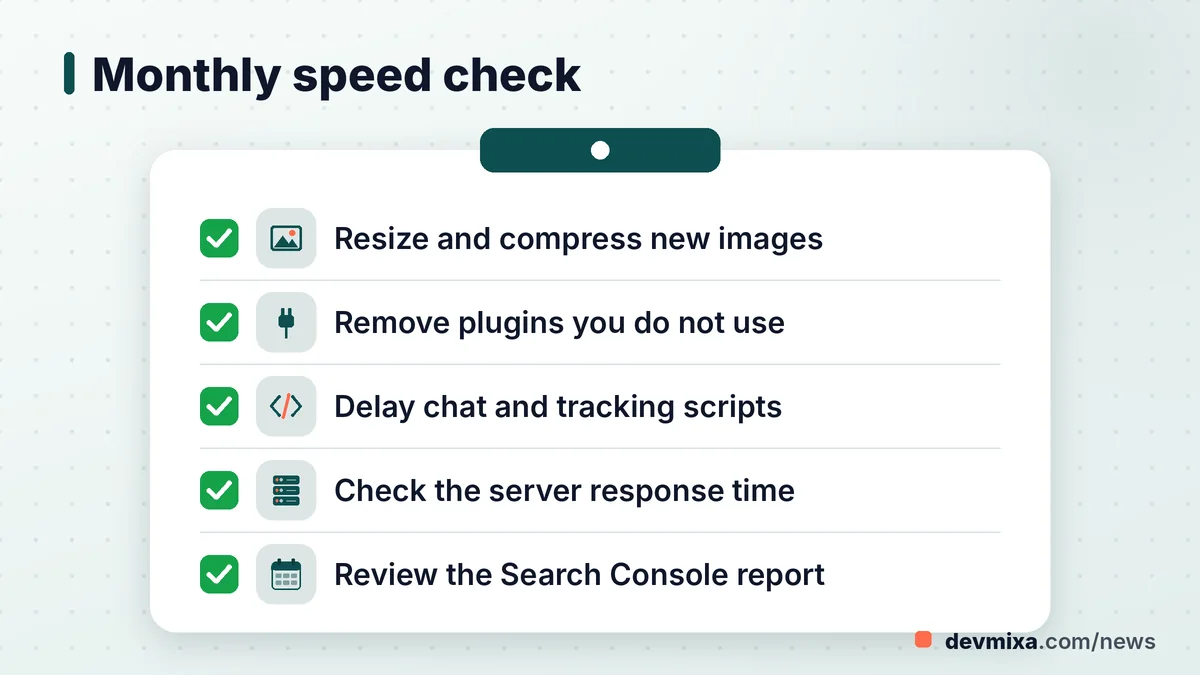
Owners can usually handle images, plugins and widgets on their own, while server changes, theme code and script loading tend to need a developer. Treat Core Web Vitals for small business sites as a monthly routine.
- Open the mobile Core Web Vitals report in Search Console and note which metric is Poor or Need improvement.
- Test three pages in PageSpeed Insights on mobile: home page, top service or product page and contact page. Read field data first.
- Prepare images before upload: resize, compress, save as WebP and keep the hero out of lazy loading.
- Review plugins and third-party scripts: remove unused ones and delay chat or tracking code.
- Update WordPress core, theme and plugins after taking a backup.
- Log the numbers in a simple sheet so you can spot the month something new slowed the site.
Hand over to a developer when TTFB stays high, when long tasks come from your theme, or when CLS comes from template code. The cost of website speed optimization in India depends on the platform, the number of templates, the hosting and whether a redesign is involved, so quotes vary widely. Ask any agency for before-and-after field data rather than a screenshot of a perfect lab score. If you would rather someone keep watch every month, a website maintenance plan can include these checks. For anything touching payments or customer data, confirm changes with your developer before going live.
Frequently asked questions
What counts as a good PageSpeed score?
PageSpeed Insights labels a Performance score of 90 or above as good, 50 to 89 as needs improvement and below 50 as poor. That number comes from a simulated lab test, though. Whether your page passes Core Web Vitals depends on the real-user field data shown above it.
Is FID still one of the Core Web Vitals?
No. Interaction to Next Paint replaced First Input Delay as a Core Web Vital on 12 March 2024. Chrome deprecated FID in its tools at the same time, and developers using the CrUX or PageSpeed Insights APIs were given until 9 September 2024 to switch to INP.
How long before Search Console reflects my fixes?
Expect about four weeks. The Core Web Vitals report uses real-user data from the previous 28 days, so improvements show up gradually as older visits drop out. If you click Start tracking, Search Console monitors a 28-day window before confirming that the issue is fixed.
Why is there no Core Web Vitals data for my site?
Your site probably does not have enough real Chrome visits for the Chrome UX Report to publish figures, which is common for new or low-traffic sites. PageSpeed Insights may fall back to whole-site data or show nothing. Use lab tests meanwhile.
Do Core Web Vitals matter for local SEO?
They matter mainly for your website rather than your map listing. Google's local results lean on relevance, distance and prominence, but customers who tap through to your site still meet its speed. A slow, jumpy page can lose the call or visit that the listing earned.
Can a CDN fix Core Web Vitals on its own?
A CDN often improves loading for visitors far from your server by caching images, CSS and scripts closer to them, which can help LCP. It does little for INP or CLS, because those come from scripts and layout on the page itself.
Do I need a perfect 100 in PageSpeed Insights?
No. A perfect lab score is not required to pass Core Web Vitals, and Google's own page experience guidance cautions that chasing perfect scores purely for SEO may not be worth the effort. Aim for green field data on mobile, then spend the remaining time on content and service.
Do the scores come from real visitors?
Yes. The pass or fail verdict uses field data from the Chrome UX Report, which collects anonymised timings from Chrome users who sync their browsing history and share usage statistics. Lab tools such as Lighthouse simulate a single visit and are best used for finding the cause of a problem.
Does my website builder affect Core Web Vitals?
Yes. Themes, page builders and add-on apps decide how much code each page ships. Hosted builders manage servers for you, yet heavy templates, sliders and stacked apps can still fail the metrics. On WordPress, a lightweight theme and a short plugin list make passing far easier.
How often should I review Core Web Vitals?
A monthly review of Core Web Vitals for small business sites is usually enough, because the data covers a rolling 28 days. Check again after any redesign, new plugin, chat widget, ad code or hosting move, since those are the changes most likely to slow a page without warning.
Planning a website, web app or SEO upgrade?
Tell us what you need. We reply within one working day with a clear plan and price.